

首先,查看发生了什么
每个下载任务都会记录近期事件:重试、重定向、服务器响应和错误。
- 将鼠标悬停在列表中的下载状态上即可查看这些信息。
- 也可以打开下载进度窗口(双击未完成的下载)。连接表会显示每个连接正在执行的操作;连接失败时,还会显示正在重试及失败原因。
- 文件属性(Alt+Enter)会显示上次尝试及其结果。
下载显示“错误”
- 查看错误原因(将鼠标悬停在状态上)。
- 选择下载任务并点击恢复。很多错误只是服务器或连接暂时出了问题。
- 如果链接已过期(登录后才能访问的网站链接或带有时限的链接常会过期),请获取新链接:右键点击 → 刷新下载地址。另请参阅恢复中断的下载。
- If it says the file changed on the server, the file isn't the one GDM started with. Right-click → Redownload to start again from the beginning.
- 如果显示Google 云端硬盘暂时无法提供此文件,则该文件已达到 Google 云端硬盘的下载限制。另请参阅Google 云端硬盘链接。
下载重新开始而不是恢复
- Look at Resume capability in the progress window. No means the server can't send a file in parts, so GDM can't continue it later.
- 有些服务器每次都会为同一个文件报告新的日期。勾选选项 → 下载 → 恢复下载时忽略文件修改时间更改。
下载速度慢
- 检查速度限制器是否已关闭:下载 → 速度限制器 → 关闭。还要查看下载 → 速度限制器 → 设置... → 将所有下载总计限制为;即使关闭速度限制器,此设置仍然生效。
- 在下载进度窗口中查看该下载自己的速度限制器选项卡。
- Check Options → Connection. A low Default max. conn. number, or an exception for the server, means fewer connections. Rows marked (auto) are servers that refused more connections; GDM can't do more there.
- 检查计划程序中的下载限制。达到限制后,下载任务会显示等待: 已达到下载限制(计划程序)。
The browser doesn't send downloads to GDM
- Was GDM installed with the setup, with Set up browser integration ticked? A portable copy can't take browser downloads. Run the setup again to add it.
- Is the extension loaded and turned on? Look for GolinksPRO Download Manager on the browser's extensions page. In Firefox, install it from addons.mozilla.org: a temporary add-on is gone after a restart. See Browser integration.
- 是否已启用选项 → 常规 → 使用高级浏览器集成,并在从以下浏览器捕获下载下勾选了您的浏览器?
- Is the file's type in Options → File types? Only listed types are taken automatically. Download with GolinksPRO Download Manager on the right-click menu takes any link.
- 该网站是否在不要从以下网站自动开始下载中?
When none of this helps, the browser keeps the download, so nothing is lost. The extension's toolbar button says why it couldn't reach GDM; see The browser and GDM aren't connected.
计划程序未启动队列
- GDM must be running at that time. Closing the window is fine (it stays in the tray); Tasks → Exit is not.
- 设置时间后,是否点击了应用?
- 每日只在勾选的日期启动。一次在只在该日期启动。
- 电脑在休眠状态下不会运行任何程序,除非队列勾选了唤醒电脑以运行此队列(在 Windows 上,电源计划中需要允许唤醒定时器;计划程序会显示其何时关闭)。请参阅唤醒电脑以运行队列。
视频无法下载
请参阅视频无法下载时。
磁力链接需要很长时间
A magnet link has to get the torrent's file list from other peers first. That can take a minute or two, and longer for torrents with few peers. If nobody answers in about three minutes, GDM gives up; try again later, or use the .torrent file if the site offers one.
GDM uses a lot of memory
任务管理器会显示多个数值,它们代表的含义各不相同:
- Memory (on the Processes tab) is what GDM holds for itself alone, its private working set. With the window open and nothing downloading, that is about 70 MB.
- Working set (Details tab, add the column) adds memory shared with other programs. GDM draws its windows with the graphics card, so the graphics driver's memory counts here too, about 120 MB in all.
- Commit size is memory GDM has reserved, whether in use or not.
Closed to the notification area, GDM gives its memory back to Windows: Memory drops to under 10 MB within seconds and stays low while it waits. Downloads, queues and the scheduler go on as before. The list of every language (View → Language) loads fonts for every script while it's open; GDM lets them go when it closes.
文字太小或模糊
GDM keeps Internet Download Manager's compact sizes. On a large or high-resolution screen, choose View → Interface size (125 %, 150 %, 175 % or 200 %), or press Ctrl + and Ctrl − in any GDM window, as in a browser; Ctrl 0 goes back to 100 %. Every window follows at once, and GDM starts at that size next time. It comes on top of Windows' own display scale (Settings → System → Display → Scale).
如果窗口在该尺寸下大于屏幕(例如在 1366 × 768 屏幕上,选项窗口设置为 200 %),它会以屏幕允许的最大尺寸打开,其余部分可滚动:使用滚动条、鼠标滚轮,或按Tab键切换到下一个控件。
GDM tells Windows it draws for each monitor's own scale, so Windows never stretches its windows into blur, and it draws Windows' fonts grid-fitted to whole pixels. If the text still looks blurred, tell us your screen's resolution and Windows' display scale when you report it.
窗口冻结或显示异常
On Windows, GDM draws its windows with Direct3D 12; on Linux and macOS, with OpenGL, or with Vulkan (Linux) or Metal (macOS) when you choose them. A graphics driver can still misbehave: a window that holds still for seconds, flickers, or shows wrong colours or blocks. Try the other one: choose View → Draw with → OpenGL (or Direct3D, Vulkan, Metal), then quit GDM (Tasks → Exit) and start it again. Choosing the first one goes back the same way.
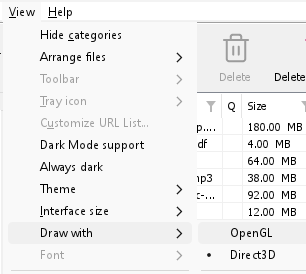
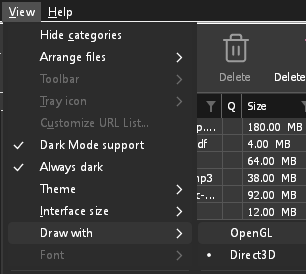
- If Direct3D, Vulkan or Metal can't start on your computer (no driver for it, some virtual machines), or its first window doesn't show within 10 seconds of its own (the time GDM spends loading your list and its icons doesn't count, however slow the computer is just after it starts), GDM draws with OpenGL, and View → Draw with says so and why. Choosing it again tries it again at the next start.
- 在 Linux 上,Vulkan 需要显卡的 Vulkan 驱动程序:AMD 和 Intel 显卡需要 Mesa 驱动(Ubuntu 和 Debian 上使用
mesa-vulkan-drivers,Arch 上使用vulkan-radeon或vulkan-intel);NVIDIA 显卡需要使用 NVIDIA 自带的驱动程序。 - If neither can start, GDM draws with a software renderer (Microsoft's on Windows, Mesa's on Linux), so the window still opens (Remote Desktop, a virtual machine without a graphics driver). It works, but keeps the processor busier.
- If the graphics card is reset while GDM runs (a driver update), GDM starts again by itself. Lost twice in 10 minutes, it goes back to OpenGL, and View → Draw with says why.
- 从显卡厂商(Intel、AMD 或 NVIDIA)的网站更新显卡驱动程序,可以解决许多此类问题。
- A freeze whose report shows the window thread inside the graphics driver as it shows a frame (
ig4icd64.dllorig9icd64.dllfor Intel,nvoglv64.dllfor NVIDIA,atio6axx.dllfor AMD, underopengl32.dll) is the driver's OpenGL stuck, not GDM: on Windows, choose View → Draw with → Direct3D (the default) and restart GDM, and update the graphics driver. If Draw with says Direct3D didn't start there, the line under it says why. - A freeze or crash report says which one was drawing, on which graphics card and driver, and why that one (chosen, the default, or the other one failing), on its
Drawing with:line near the top: include it when you report a problem. A freeze report also says whether GDM was busy, waiting, or hardly ran at all (a computer too busy to run it); see Crash reports.
The setup or GDM won't start
- 如果 Windows 提示Windows 已保护你的电脑,请点击更多信息,确认文件
MisterDownloadManager-<version>-setup.exe来自发布页面,然后点击仍要运行。 - GDM runs only once. Starting it again brings the running copy's window to the front. If nothing appears, look for GDM's icon in the notification area.
- Linux, from the AppImage or the tar.gz: if the system lacks a library GDM's window needs (such as
libxkbcommon-x11), GDM names it on the terminal and in a message box, with the command that installs it (sudo apt install libxkbcommon-x11-0, or your distribution's). The .deb and .rpm bring these libraries themselves. In a Wayland session GDM opens its window on Wayland instead. - Linux, the first start is slow: GDM looks up the system's fonts for every script once, all together, while it starts (fontconfig); a first start on a busy computer can take a few seconds more. Install your distribution's Noto fonts if some scripts or symbols show as boxes.
My antivirus or VirusTotal flags GDM
一些杀毒软件会标记不常见的安装程序,尤其是那些使用机器学习引擎的。在 VirusTotal 上,如果只有少数小型引擎标记了一个新的安装程序,而主流引擎没有,这通常是误报。我们发现此类情况时会向厂商报告。
要检查您的副本是否为正版:
- Download GDM only from the website or GitHub Releases.
- 获取您文件的 SHA-256 值。在 Windows 上,运行
certutil -hashfile "MisterDownloadManager-0.5.0-setup.exe" SHA256;在 Linux 上,运行sha256sum并加上文件名。 - 将其与该版本
SHA256SUMS.txt中对应文件的行进行比较。
如果匹配,则说明是官方发布的文件。每个版本都是在 GitHub 上从公开源代码构建的,因此任何人都可以查看其内容。
If your antivirus quarantined GDM, restore it and add an exception for its folder. If it flags something other than the setup or GDM's own programs, or a copy from anywhere else, don't run it, and please tell us.
HTTPS 下载失败,显示“无证书”(Linux)
A minimal Linux system (often with the AppImage, the tar.gz or a build from source) may have no CA certificates, which GDM needs to check a secure server. Plain http:// and ftp:// downloads still work; each https:// or ftps:// one stops at once saying the computer has no certificates to check the server with. Install the ca-certificates package (sudo apt install ca-certificates, sudo dnf install ca-certificates), then resume the download. The .deb and .rpm bring it.
数据存储位置
- 已安装版或普通 zip 版:
%APPDATA%\misterdownloadmanager。列表和设置位于downloads.json中。 - 便携版:
misterdownloadmanager.exe旁边的data文件夹。 - Linux:
~/.local/share/misterdownloadmanager;Mac:~/Library/Application Support/misterdownloadmanager。 - 密码(站点登录、代理、网盘账户)存储在系统的钥匙串中,而不是在
downloads.json中;请参阅选项 → 站点登录。
To back up your list, quit GDM (Tasks → Exit) and copy downloads.json.
更新
Help → Check for updates... tells you whether a newer version is out, and what is new in it. Check for updates at every start in that window lets GDM look by itself: a few seconds after it starts, and once a day while it stays open. When there's a new version, its window opens in front.
When there is one, Update now downloads it, checks it, puts it in place and restarts GDM; your list, settings and downloads stay as they are:
| 安装方式 | “立即更新”执行的操作 |
|---|---|
| Windows,安装程序 | 在后台运行新的安装程序。为所有用户安装时,需要管理员授权。 |
| Windows,便携版或普通 zip | 替换其文件夹中的程序(便携版副本的data文件夹会保留)。 |
| Mac | 替换“应用程序”中的应用。 |
| Linux,AppImage 或 .tar.gz | 替换 AppImage,或其文件夹中的程序。 |
| Linux,.deb 或 .rpm | 在系统的软件包安装程序中打开已检查的软件包;安装程序会要求输入密码。 |
| Linux,其他包管理器(pacman 等)的包 | 无:窗口会显示,并且您的系统更新会带来新版本。 |
GDM installs an update only when the release's list of checksums is signed by GDM's release key and the file matches it; anything else is refused, and Download opens the Releases page instead. Updating this way starts with version 0.2.1: earlier versions open the Releases page.
也可以使用 AppImage 工具(AppImageLauncher、Gear Lever、AppImageUpdate)更新 AppImage:其中包含更新地址,每个版本都有自己的 .AppImage.zsync 文件,因此这些工具只会下载发生变化的部分。此功能从 0.2.4 之后版本的 AppImage 开始提供。
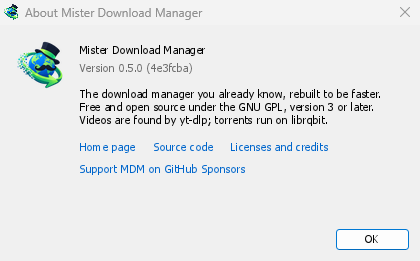
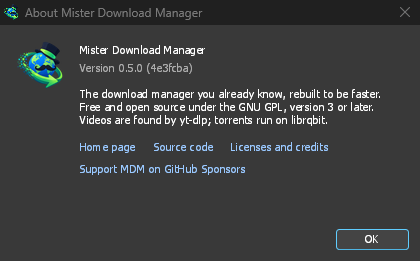
Help → About GolinksPRO Download Manager shows the version you have.
报告问题
Choose Help → Report a problem. It opens the bug report form on GitHub with your GDM version, your system and its version, how GDM was installed and its interface language already filled in. Describe what happened, what you expected and the steps that make it happen. For a download, include the address if you can share it, and the reason shown under Status.
你也可以自行打开表单;它会要求相同的详细信息。
下一步
免费、开源、无广告、无试用版。
Download GolinksPRO Download Manager