

Schauen Sie zuerst, was passiert ist
Jeder Download protokolliert seine letzten Ereignisse: Wiederholungsversuche, Weiterleitungen, Serverantworten und Fehler.
- Fahren Sie mit der Maus über den Status des Downloads in der Liste, um die Ereignisse zu sehen.
- Oder öffnen Sie das Fortschrittsfenster (doppelklicken Sie auf einen noch nicht abgeschlossenen Download). Die Verbindungstabelle zeigt, was die einzelnen Verbindungen gerade tun. Wenn eine Verbindung fehlschlägt, wird Wird wiederholt mit dem Grund angezeigt.
- Unter Dateieigenschaften (Alt+Enter) finden Sie Letzter Versuch und das Ergebnis.
Ein Download meldet einen Fehler
- Lesen Sie den Grund ab (fahren Sie mit der Maus über den Status).
- Wählen Sie den Download aus und klicken Sie auf Fortsetzen. Viele Fehler sind auf einen Server oder eine Verbindung zurückzuführen, die einen schlechten Moment hat.
- Wenn der Link abgelaufen ist (häufig bei Links von Websites, bei denen Sie angemeldet sind, oder Links mit einer Zeitbegrenzung), besorgen Sie sich einen neuen: Rechtsklick → Downloadadresse aktualisieren. Siehe Einen unterbrochenen Download fortsetzen.
- If it says the file changed on the server, the file isn't the one GDM started with. Right-click → Redownload to start again from the beginning.
- Wenn die Meldung Google Drive stellt diese Datei momentan nicht bereit erscheint, wurde das Download-Limit von Drive für diese Datei erreicht. Siehe Google Drive-Links.
Ein Download beginnt von vorne, anstatt fortgesetzt zu werden
- Look at Resume capability in the progress window. No means the server can't send a file in parts, so GDM can't continue it later.
- Einige Server geben für dieselbe Datei jedes Mal ein neues Datum an. Aktivieren Sie Optionen → Downloads → Dateiänderungszeiten beim Fortsetzen eines Downloads ignorieren.
Downloads sind langsam
- Stellen Sie sicher, dass der Geschwindigkeitsbegrenzer ausgeschaltet ist: Downloads → Geschwindigkeitsbegrenzer → Deaktivieren. Schauen Sie auch unter Downloads → Geschwindigkeitsbegrenzer → Einstellungen... → Alle Downloads zusammen begrenzen auf nach, was auch bei ausgeschaltetem Begrenzer gilt.
- Prüfen Sie den Tab Geschwindigkeitsbegrenzer im Fortschrittsfenster des Downloads.
- Check Options → Connection. A low Default max. conn. number, or an exception for the server, means fewer connections. Rows marked (auto) are servers that refused more connections; GDM can't do more there.
- Überprüfen Sie die Download-Limits im Zeitplaner. Wenn das Limit erreicht ist, warten Downloads mit Wartend: Das Downloadlimit ist erreicht (Planer).
The browser doesn't send downloads to GDM
- Was GDM installed with the setup, with Set up browser integration ticked? A portable copy can't take browser downloads. Run the setup again to add it.
- Is the extension loaded and turned on? Look for GolinksPRO Download Manager on the browser's extensions page. In Firefox, install it from addons.mozilla.org: a temporary add-on is gone after a restart. See Browser integration.
- Ist Optionen → Allgemein → Erweiterte Browserintegration verwenden aktiviert und Ihr Browser unter Downloads von folgenden Browsern erfassen angekreuzt?
- Is the file's type in Options → File types? Only listed types are taken automatically. Download with GolinksPRO Download Manager on the right-click menu takes any link.
- Ist die Website unter Downloads von folgenden Websites nicht automatisch starten aufgeführt?
When none of this helps, the browser keeps the download, so nothing is lost. The extension's toolbar button says why it couldn't reach GDM; see The browser and GDM aren't connected.
Der Zeitplaner hat die Warteschlange nicht gestartet
- GDM must be running at that time. Closing the window is fine (it stays in the tray); Tasks → Exit is not.
- Haben Sie nach dem Einstellen der Zeit auf Übernehmen geklickt?
- Täglich startet nur an den angekreuzten Tagen. Einmal um startet nur an diesem Datum.
- Ein Computer, der sich im Ruhezustand befindet, führt nichts aus, bis er aufwacht, es sei denn, bei der Warteschlange ist Computer wecken, um diese Warteschlange auszuführen aktiviert (unter Windows muss Zeitgeber zur Aktivierung zulassen im Energiesparplan eingestellt sein; der Zeitplaner zeigt an, wann er ausgeschaltet ist). Siehe Computer wecken, um eine Warteschlange auszuführen.
Ein Video wird nicht heruntergeladen
Siehe Wenn ein Video nicht heruntergeladen wird.
Ein Magnet-Link braucht lange
A magnet link has to get the torrent's file list from other peers first. That can take a minute or two, and longer for torrents with few peers. If nobody answers in about three minutes, GDM gives up; try again later, or use the .torrent file if the site offers one.
GDM uses a lot of memory
Der Task-Manager zeigt verschiedene Zahlen an, die unterschiedliche Dinge bedeuten:
- Memory (on the Processes tab) is what GDM holds for itself alone, its private working set. With the window open and nothing downloading, that is about 70 MB.
- Working set (Details tab, add the column) adds memory shared with other programs. GDM draws its windows with the graphics card, so the graphics driver's memory counts here too, about 120 MB in all.
- Commit size is memory GDM has reserved, whether in use or not.
Closed to the notification area, GDM gives its memory back to Windows: Memory drops to under 10 MB within seconds and stays low while it waits. Downloads, queues and the scheduler go on as before. The list of every language (View → Language) loads fonts for every script while it's open; GDM lets them go when it closes.
Der Text ist zu klein oder unscharf
GDM keeps Internet Download Manager's compact sizes. On a large or high-resolution screen, choose View → Interface size (125 %, 150 %, 175 % or 200 %), or press Ctrl + and Ctrl − in any GDM window, as in a browser; Ctrl 0 goes back to 100 %. Every window follows at once, and GDM starts at that size next time. It comes on top of Windows' own display scale (Settings → System → Display → Scale).
Ein Fenster, das bei dieser Größe größer als der Bildschirm ist (Optionen bei 200 % auf einem 1366 × 768 Bildschirm), öffnet sich so groß, wie der Bildschirm es zulässt, und der Rest scrollt: mit den Bildlaufleisten, dem Mausrad oder Tab zum nächsten Steuerelement.
GDM tells Windows it draws for each monitor's own scale, so Windows never stretches its windows into blur, and it draws Windows' fonts grid-fitted to whole pixels. If the text still looks blurred, tell us your screen's resolution and Windows' display scale when you report it.
Das Fenster friert ein oder wird falsch dargestellt
On Windows, GDM draws its windows with Direct3D 12; on Linux and macOS, with OpenGL, or with Vulkan (Linux) or Metal (macOS) when you choose them. A graphics driver can still misbehave: a window that holds still for seconds, flickers, or shows wrong colours or blocks. Try the other one: choose View → Draw with → OpenGL (or Direct3D, Vulkan, Metal), then quit GDM (Tasks → Exit) and start it again. Choosing the first one goes back the same way.
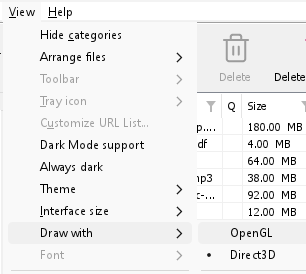
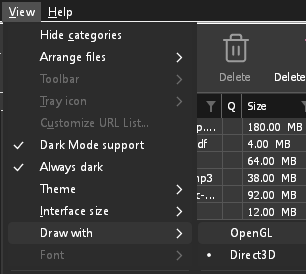
- If Direct3D, Vulkan or Metal can't start on your computer (no driver for it, some virtual machines), or its first window doesn't show within 10 seconds of its own (the time GDM spends loading your list and its icons doesn't count, however slow the computer is just after it starts), GDM draws with OpenGL, and View → Draw with says so and why. Choosing it again tries it again at the next start.
- Unter Linux benötigt Vulkan den Vulkan-Treiber Ihrer Grafikkarte: Mesas (
mesa-vulkan-driversunter Ubuntu und Debian,vulkan-radeonodervulkan-intelunter Arch) für AMD und Intel, NVIDIAs eigenen Treiber für NVIDIA. - If neither can start, GDM draws with a software renderer (Microsoft's on Windows, Mesa's on Linux), so the window still opens (Remote Desktop, a virtual machine without a graphics driver). It works, but keeps the processor busier.
- If the graphics card is reset while GDM runs (a driver update), GDM starts again by itself. Lost twice in 10 minutes, it goes back to OpenGL, and View → Draw with says why.
- Das Aktualisieren des Grafiktreibers von der Website des Kartenherstellers (Intel, AMD oder NVIDIA) behebt viele dieser Probleme.
- A freeze whose report shows the window thread inside the graphics driver as it shows a frame (
ig4icd64.dllorig9icd64.dllfor Intel,nvoglv64.dllfor NVIDIA,atio6axx.dllfor AMD, underopengl32.dll) is the driver's OpenGL stuck, not GDM: on Windows, choose View → Draw with → Direct3D (the default) and restart GDM, and update the graphics driver. If Draw with says Direct3D didn't start there, the line under it says why. - A freeze or crash report says which one was drawing, on which graphics card and driver, and why that one (chosen, the default, or the other one failing), on its
Drawing with:line near the top: include it when you report a problem. A freeze report also says whether GDM was busy, waiting, or hardly ran at all (a computer too busy to run it); see Crash reports.
The setup or GDM won't start
- Wenn Windows Windows hat Ihren PC geschützt anzeigt, klicken Sie auf Weitere Informationen, prüfen Sie, ob die Datei
MisterDownloadManager-<version>-setup.exevon der Releases-Seite stammt, und klicken Sie dann auf Trotzdem ausführen. - GDM runs only once. Starting it again brings the running copy's window to the front. If nothing appears, look for GDM's icon in the notification area.
- Linux, from the AppImage or the tar.gz: if the system lacks a library GDM's window needs (such as
libxkbcommon-x11), GDM names it on the terminal and in a message box, with the command that installs it (sudo apt install libxkbcommon-x11-0, or your distribution's). The .deb and .rpm bring these libraries themselves. In a Wayland session GDM opens its window on Wayland instead. - Linux, the first start is slow: GDM looks up the system's fonts for every script once, all together, while it starts (fontconfig); a first start on a busy computer can take a few seconds more. Install your distribution's Noto fonts if some scripts or symbols show as boxes.
My antivirus or VirusTotal flags GDM
Einige Antivirenprogramme melden neue Installationsdateien, nur weil sie diese selten gesehen haben. Dies gilt besonders für Machine-Learning-Engines. Wenn auf VirusTotal einige kleine Engines eine neue Installation melden, während die großen sauber bleiben, handelt es sich meist um einen Fehlalarm. Wir melden solche Fälle den Anbietern, sobald wir sie bemerken.
So überprüfen Sie, ob Ihre Kopie die echte ist:
- Download GDM only from the website or GitHub Releases.
- Ermitteln Sie den SHA-256-Hash Ihrer Datei. Führen Sie unter Windows
certutil -hashfile "MisterDownloadManager-0.5.0-setup.exe" SHA256aus; unter Linuxsha256sumgefolgt vom Dateinamen. - Vergleichen Sie ihn mit der entsprechenden Zeile in der
SHA256SUMS.txtdieser Version.
Wenn sie übereinstimmen, ist es die von uns veröffentlichte Datei. Jede Version wird auf GitHub aus dem öffentlichen Quellcode erstellt, sodass jeder nachvollziehen kann, was darin enthalten ist.
If your antivirus quarantined GDM, restore it and add an exception for its folder. If it flags something other than the setup or GDM's own programs, or a copy from anywhere else, don't run it, and please tell us.
HTTPS-Downloads schlagen fehl mit „keine Zertifikate“ (Linux)
A minimal Linux system (often with the AppImage, the tar.gz or a build from source) may have no CA certificates, which GDM needs to check a secure server. Plain http:// and ftp:// downloads still work; each https:// or ftps:// one stops at once saying the computer has no certificates to check the server with. Install the ca-certificates package (sudo apt install ca-certificates, sudo dnf install ca-certificates), then resume the download. The .deb and .rpm bring it.
Wo Ihre Daten sind
- Installiert oder als einfaches Zip:
%APPDATA%\misterdownloadmanager. Die Liste und die Einstellungen befinden sich indownloads.json. - Portabel: der Ordner
datanebenmisterdownloadmanager.exe. - Linux:
~/.local/share/misterdownloadmanager; ein Mac:~/Library/Application Support/misterdownloadmanager. - Passwörter (Site-Anmeldungen, der Proxy, Debrid-Konten) befinden sich im Schlüsselbund des Systems, nicht in
downloads.json; siehe Optionen → Site-Anmeldungen.
To back up your list, quit GDM (Tasks → Exit) and copy downloads.json.
Updates
Help → Check for updates... tells you whether a newer version is out, and what is new in it. Check for updates at every start in that window lets GDM look by itself: a few seconds after it starts, and once a day while it stays open. When there's a new version, its window opens in front.
When there is one, Update now downloads it, checks it, puts it in place and restarts GDM; your list, settings and downloads stay as they are:
| Installierte Version | Was „Jetzt aktualisieren“ macht |
|---|---|
| Windows, die Installation | Führt das neue Installationsprogramm ohne Fenster aus. Bei einer Installation für alle Benutzer ist die Zustimmung des Administrators erforderlich. |
| Windows, portable Version oder ZIP-Datei | Ersetzt die Programme in ihrem Ordner (der data-Ordner einer portablen Kopie bleibt erhalten). |
| Mac | Ersetzt die App im Ordner „Programme“. |
| Linux, das AppImage oder die .tar.gz | Ersetzt das AppImage oder die Programme in ihrem Ordner. |
| Linux, .deb- oder .rpm-Paket | Öffnet das überprüfte Paket im Paketinstallationsprogramm Ihres Systems. Dieses fragt nach Ihrem Passwort. |
| Linux, Paket eines anderen Paketmanagers (pacman, ...) | Nichts: Das Fenster zeigt es an, und die Updates Ihres Systems bringen die neue Version. |
GDM installs an update only when the release's list of checksums is signed by GDM's release key and the file matches it; anything else is refused, and Download opens the Releases page instead. Updating this way starts with version 0.2.1: earlier versions open the Releases page.
Das AppImage kann auch mit AppImage-Tools (AppImageLauncher, Gear Lever, AppImageUpdate) aktualisiert werden: Es enthält die Adresse seiner Updates, und jede Version hat ihre .AppImage.zsync-Datei, sodass diese Tools nur die geänderten Teile herunterladen. Dies ist ab dem AppImage der Version nach 0.2.4 möglich.
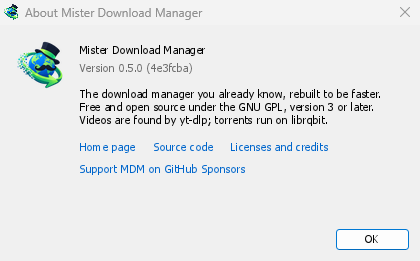
Help → About GolinksPRO Download Manager shows the version you have.
Ein Problem melden
Choose Help → Report a problem. It opens the bug report form on GitHub with your GDM version, your system and its version, how GDM was installed and its interface language already filled in. Describe what happened, what you expected and the steps that make it happen. For a download, include the address if you can share it, and the reason shown under Status.
Sie können das Formular auch selbst öffnen; es fragt nach denselben Details.
Nächste Schritte
Kostenlos, Open Source, keine Werbung, keine Testversion.
Download GolinksPRO Download Manager