

Per prima cosa, controlla cosa è successo
Ogni download conserva un log degli eventi recenti: tentativi, reindirizzamenti, risposte ed errori del server.
- Passa il puntatore sullo Stato del download nell'elenco per vederli.
- Oppure apri la sua finestra di avanzamento (fai doppio clic su un download non completato). La tabella delle connessioni mostra cosa sta facendo ogni connessione e Nuovo tentativo, con il motivo, quando una non riesce.
- Le Proprietà del file (Alt+Invio) mostrano Ultimo tentativo e il suo Risultato.
Un download mostra Errore
- Leggi il motivo (passa il puntatore sullo Stato).
- Seleziona il download e fai clic su Riprendi. Molti errori sono dovuti a un server o a una connessione che ha un momento di difficoltà.
- Se il collegamento è scaduto (succede spesso con i siti che richiedono l'accesso o con i collegamenti che hanno una scadenza), ottienine uno nuovo: clic destro → Aggiorna indirizzo di download. Vedi Riprendere un download interrotto.
- If it says the file changed on the server, the file isn't the one GDM started with. Right-click → Redownload to start again from the beginning.
- Se compare Google Drive non fornirà questo file ora, è stato raggiunto il limite di download di Drive per quel file. Vedi Collegamenti di Google Drive.
Un download ricomincia da capo invece di riprendere
- Look at Resume capability in the progress window. No means the server can't send a file in parts, so GDM can't continue it later.
- Alcuni server segnalano una nuova data per lo stesso file ogni volta. Seleziona Opzioni → Download → Ignora i cambiamenti della data di modifica del file quando si riprende un download.
I download sono lenti
- Verifica che il Limitatore di velocità sia disattivato: Download → Limitatore di velocità → Disattiva. Controlla anche Download → Limitatore di velocità → Impostazioni... → Limita il totale di tutti i download a, che si applica anche con il limitatore disattivato.
- Controlla la scheda Limitatore di velocità del download nella sua finestra di avanzamento.
- Check Options → Connection. A low Default max. conn. number, or an exception for the server, means fewer connections. Rows marked (auto) are servers that refused more connections; GDM can't do more there.
- Controlla i Limiti di download nel Pianificatore. Quando il limite viene raggiunto, i download attendono con In attesa: limite di download raggiunto (Pianificatore).
The browser doesn't send downloads to GDM
- Was GDM installed with the setup, with Set up browser integration ticked? A portable copy can't take browser downloads. Run the setup again to add it.
- Is the extension loaded and turned on? Look for GolinksPRO Download Manager on the browser's extensions page. In Firefox, install it from addons.mozilla.org: a temporary add-on is gone after a restart. See Browser integration.
- È attivata l'opzione Opzioni → Generale → Usa l'integrazione avanzata con i browser e il tuo browser è selezionato sotto Acquisisci i download dai seguenti browser?
- Is the file's type in Options → File types? Only listed types are taken automatically. Download with GolinksPRO Download Manager on the right-click menu takes any link.
- Il sito è in Non avviare automaticamente il download dai seguenti siti?
When none of this helps, the browser keeps the download, so nothing is lost. The extension's toolbar button says why it couldn't reach GDM; see The browser and GDM aren't connected.
Il Pianificatore non ha avviato la coda
- GDM must be running at that time. Closing the window is fine (it stays in the tray); Tasks → Exit is not.
- Hai fatto clic su Applica dopo aver impostato l'ora?
- Ogni giorno si avvia solo nei giorni selezionati. Una volta alle si avvia solo in quella data.
- Un computer in sospensione non esegue nulla finché non si riattiva, a meno che per la coda non sia selezionata l'opzione Riattiva il computer per eseguire questa coda (su Windows serve Consenti timer di riattivazione nel piano di alimentazione; il Pianificatore indica quando è disattivato). Vedi Riattiva il computer per eseguire una coda.
Un video non si scarica
Vedi Se un video non si scarica.
Un link magnet impiega molto tempo
A magnet link has to get the torrent's file list from other peers first. That can take a minute or two, and longer for torrents with few peers. If nobody answers in about three minutes, GDM gives up; try again later, or use the .torrent file if the site offers one.
GDM uses a lot of memory
Gestione attività mostra diverse cifre, che indicano cose diverse:
- Memory (on the Processes tab) is what GDM holds for itself alone, its private working set. With the window open and nothing downloading, that is about 70 MB.
- Working set (Details tab, add the column) adds memory shared with other programs. GDM draws its windows with the graphics card, so the graphics driver's memory counts here too, about 120 MB in all.
- Commit size is memory GDM has reserved, whether in use or not.
Closed to the notification area, GDM gives its memory back to Windows: Memory drops to under 10 MB within seconds and stays low while it waits. Downloads, queues and the scheduler go on as before. The list of every language (View → Language) loads fonts for every script while it's open; GDM lets them go when it closes.
Il testo è troppo piccolo o sfocato
GDM keeps Internet Download Manager's compact sizes. On a large or high-resolution screen, choose View → Interface size (125 %, 150 %, 175 % or 200 %), or press Ctrl + and Ctrl − in any GDM window, as in a browser; Ctrl 0 goes back to 100 %. Every window follows at once, and GDM starts at that size next time. It comes on top of Windows' own display scale (Settings → System → Display → Scale).
Una finestra più grande dello schermo a quella dimensione (Opzioni al 200 % su uno schermo 1366 × 768) si apre grande quanto lo schermo consente, e il resto scorre: con le barre di scorrimento, la rotellina del mouse o Tab per passare al controllo successivo.
GDM tells Windows it draws for each monitor's own scale, so Windows never stretches its windows into blur, and it draws Windows' fonts grid-fitted to whole pixels. If the text still looks blurred, tell us your screen's resolution and Windows' display scale when you report it.
La finestra si blocca o viene visualizzata in modo errato
On Windows, GDM draws its windows with Direct3D 12; on Linux and macOS, with OpenGL, or with Vulkan (Linux) or Metal (macOS) when you choose them. A graphics driver can still misbehave: a window that holds still for seconds, flickers, or shows wrong colours or blocks. Try the other one: choose View → Draw with → OpenGL (or Direct3D, Vulkan, Metal), then quit GDM (Tasks → Exit) and start it again. Choosing the first one goes back the same way.
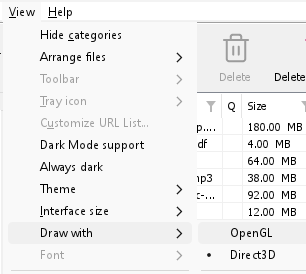
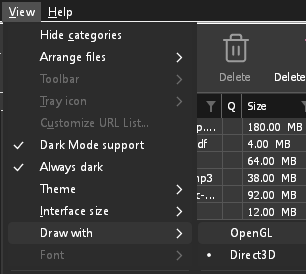
- If Direct3D, Vulkan or Metal can't start on your computer (no driver for it, some virtual machines), or its first window doesn't show within 10 seconds of its own (the time GDM spends loading your list and its icons doesn't count, however slow the computer is just after it starts), GDM draws with OpenGL, and View → Draw with says so and why. Choosing it again tries it again at the next start.
- Su Linux, Vulkan richiede il driver Vulkan della tua scheda grafica: quello di Mesa (
mesa-vulkan-driverssu Ubuntu e Debian,vulkan-radeonovulkan-intelsu Arch) per AMD e Intel, il driver proprietario di NVIDIA per NVIDIA. - If neither can start, GDM draws with a software renderer (Microsoft's on Windows, Mesa's on Linux), so the window still opens (Remote Desktop, a virtual machine without a graphics driver). It works, but keeps the processor busier.
- If the graphics card is reset while GDM runs (a driver update), GDM starts again by itself. Lost twice in 10 minutes, it goes back to OpenGL, and View → Draw with says why.
- Aggiornare il driver grafico dal sito del produttore della scheda (Intel, AMD o NVIDIA) risolve molti di questi problemi.
- A freeze whose report shows the window thread inside the graphics driver as it shows a frame (
ig4icd64.dllorig9icd64.dllfor Intel,nvoglv64.dllfor NVIDIA,atio6axx.dllfor AMD, underopengl32.dll) is the driver's OpenGL stuck, not GDM: on Windows, choose View → Draw with → Direct3D (the default) and restart GDM, and update the graphics driver. If Draw with says Direct3D didn't start there, the line under it says why. - A freeze or crash report says which one was drawing, on which graphics card and driver, and why that one (chosen, the default, or the other one failing), on its
Drawing with:line near the top: include it when you report a problem. A freeze report also says whether GDM was busy, waiting, or hardly ran at all (a computer too busy to run it); see Crash reports.
The setup or GDM won't start
- Se Windows mostra Windows ha protetto il PC, fai clic su Ulteriori informazioni, verifica che il file sia
MisterDownloadManager-<version>-setup.exedella pagina Release, poi fai clic su Esegui comunque. - GDM runs only once. Starting it again brings the running copy's window to the front. If nothing appears, look for GDM's icon in the notification area.
- Linux, from the AppImage or the tar.gz: if the system lacks a library GDM's window needs (such as
libxkbcommon-x11), GDM names it on the terminal and in a message box, with the command that installs it (sudo apt install libxkbcommon-x11-0, or your distribution's). The .deb and .rpm bring these libraries themselves. In a Wayland session GDM opens its window on Wayland instead. - Linux, the first start is slow: GDM looks up the system's fonts for every script once, all together, while it starts (fontconfig); a first start on a busy computer can take a few seconds more. Install your distribution's Noto fonts if some scripts or symbols show as boxes.
My antivirus or VirusTotal flags GDM
Alcuni programmi antivirus segnalano i nuovi installer solo perché li hanno visti raramente, e i motori di machine learning lo fanno più spesso. Su VirusTotal, se una manciata di piccoli motori segnala una nuova installazione mentre quelli grandi restano puliti, di solito è un falso positivo. Noi lo segnaliamo ai fornitori quando lo vediamo.
Per verificare che la tua copia sia quella autentica:
- Download GDM only from the website or GitHub Releases.
- Ottieni l'SHA-256 del tuo file. Su Windows, esegui
certutil -hashfile "MisterDownloadManager-0.5.0-setup.exe" SHA256; su Linux,sha256sume il nome del file. - Confrontalo con la riga dello stesso file nel
SHA256SUMS.txtdi quella release.
Se corrispondono, è il file che abbiamo pubblicato. Ogni release è creata su GitHub dal codice sorgente pubblico, così chiunque può leggere cosa contiene.
If your antivirus quarantined GDM, restore it and add an exception for its folder. If it flags something other than the setup or GDM's own programs, or a copy from anywhere else, don't run it, and please tell us.
I download HTTPS non riescono con "nessun certificato" (Linux)
A minimal Linux system (often with the AppImage, the tar.gz or a build from source) may have no CA certificates, which GDM needs to check a secure server. Plain http:// and ftp:// downloads still work; each https:// or ftps:// one stops at once saying the computer has no certificates to check the server with. Install the ca-certificates package (sudo apt install ca-certificates, sudo dnf install ca-certificates), then resume the download. The .deb and .rpm bring it.
Dove si trovano i tuoi dati
- Installato o zip semplice:
%APPDATA%\misterdownloadmanager. L'elenco e le impostazioni si trovano indownloads.json. - Portatile: la cartella
dataaccanto amisterdownloadmanager.exe. - Linux:
~/.local/share/misterdownloadmanager; un Mac:~/Library/Application Support/misterdownloadmanager. - Le password (Accessi ai siti, il proxy, gli account debrid) si trovano nel portachiavi del sistema, non in
downloads.json; vedi Opzioni → Accessi ai siti.
To back up your list, quit GDM (Tasks → Exit) and copy downloads.json.
Aggiornamenti
Help → Check for updates... tells you whether a newer version is out, and what is new in it. Check for updates at every start in that window lets GDM look by itself: a few seconds after it starts, and once a day while it stays open. When there's a new version, its window opens in front.
When there is one, Update now downloads it, checks it, puts it in place and restarts GDM; your list, settings and downloads stay as they are:
| Hai installato | Cosa fa Aggiorna ora |
|---|---|
| Windows, il programma di installazione | Avvia il nuovo programma di installazione senza mostrarne le finestre. Per installare il programma per tutti gli utenti serve l'autorizzazione dell'amministratore. |
| Windows, la copia portatile o lo zip semplice | Sostituisce i programmi nella relativa cartella (la cartella data di una copia portatile viene mantenuta). |
| Mac | Sostituisce l'app nella cartella Applicazioni. |
| Linux, l'AppImage o il .tar.gz | Sostituisce l'AppImage o i programmi nella relativa cartella. |
| Linux, il .deb o .rpm | Apre il pacchetto verificato nel programma di installazione dei pacchetti del sistema, che chiede la password. |
| Linux, un pacchetto di un altro gestore di pacchetti (pacman, ...) | Nulla: la finestra lo indica, e gli aggiornamenti del sistema portano la nuova versione. |
GDM installs an update only when the release's list of checksums is signed by GDM's release key and the file matches it; anything else is refused, and Download opens the Releases page instead. Updating this way starts with version 0.2.1: earlier versions open the Releases page.
L'AppImage può essere aggiornata anche con strumenti per AppImage (AppImageLauncher, Gear Lever, AppImageUpdate): contiene l'indirizzo dei suoi aggiornamenti e ogni release include il suo file .AppImage.zsync, così questi strumenti scaricano solo le parti modificate. Questa funzione è disponibile a partire dall'AppImage della versione successiva alla 0.2.4.
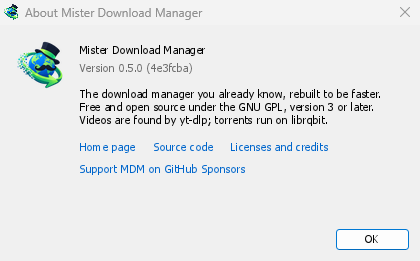
Help → About GolinksPRO Download Manager shows the version you have.
Segnalare un problema
Choose Help → Report a problem. It opens the bug report form on GitHub with your GDM version, your system and its version, how GDM was installed and its interface language already filled in. Describe what happened, what you expected and the steps that make it happen. For a download, include the address if you can share it, and the reason shown under Status.
Puoi anche aprire il modulo direttamente; ti chiede le stesse informazioni.
Passi successivi
- Riprendere un download interrotto →
- Integrazione con i browser →
- Torna all'indice della documentazione →
Gratuito, open source, senza pubblicità, senza periodo di prova.
Download GolinksPRO Download Manager