

Спершу подивіться, що сталося
Кожне завантаження зберігає журнал своїх останніх подій: повторні спроби, перенаправлення, відповіді сервера та помилки.
- Наведіть курсор на Стан завантаження у списку, щоб їх побачити.
- Або відкрийте вікно його прогресу (двічі клацніть незавершене завантаження). Таблиця з’єднань показує, що робить кожне з’єднання, а Повторна спроба з причиною, коли одне з них не вдається.
- Властивості файлу (Alt+Enter) показують Остання спроба та її Результат.
Завантаження показує Помилка
- Прочитайте причину (наведіть курсор на Стан).
- Виберіть завантаження та натисніть Продовжити. Багато помилок виникають через тимчасові проблеми сервера або з’єднання.
- Якщо посилання застаріло (часто для посилань із сайтів, на які ви входите, або посилань з обмеженням часу), отримайте нове: клацніть правою кнопкою миші → Оновити адресу завантаження. Дивіться Відновлення перерваного завантаження.
- If it says the file changed on the server, the file isn't the one GDM started with. Right-click → Redownload to start again from the beginning.
- Якщо з’являється повідомлення Google Диск не надасть цей файл зараз, це означає, що ліміт завантажень для цього файлу на Диску було досягнуто. Дивіться Посилання на Google Диск.
Завантаження починається знову замість відновлення
- Look at Resume capability in the progress window. No means the server can't send a file in parts, so GDM can't continue it later.
- Деякі сервери щоразу повідомляють нову дату для того самого файлу. Поставте позначку Параметри → Завантаження → Ігнорувати зміни часу модифікації файлу при відновленні завантаження.
Завантаження повільні
- Перевірте, чи вимкнено Обмежувач швидкості: Завантаження → Обмежувач швидкості → Вимкнути. Також подивіться на Завантаження → Обмежувач швидкості → Налаштування... → Обмежити всі завантаження разом до, що застосовується навіть при вимкненому обмежувачі.
- Перевірте власну вкладку Обмежувач швидкості завантаження у вікні його прогресу.
- Check Options → Connection. A low Default max. conn. number, or an exception for the server, means fewer connections. Rows marked (auto) are servers that refused more connections; GDM can't do more there.
- Перевірте Обмеження завантаження у Планувальнику. Коли ліміт досягнуто, завантаження чекають зі Очікування: досягнуто ліміту завантажень (Планувальник).
The browser doesn't send downloads to GDM
- Was GDM installed with the setup, with Set up browser integration ticked? A portable copy can't take browser downloads. Run the setup again to add it.
- Is the extension loaded and turned on? Look for GolinksPRO Download Manager on the browser's extensions page. In Firefox, install it from addons.mozilla.org: a temporary add-on is gone after a restart. See Browser integration.
- Чи увімкнено Параметри → Загальні → Використовувати розширену інтеграцію з браузером, і чи позначено ваш браузер у розділі Перехоплювати завантаження з наступних браузерів?
- Is the file's type in Options → File types? Only listed types are taken automatically. Download with GolinksPRO Download Manager on the right-click menu takes any link.
- Чи є сайт у Не починати завантаження автоматично з наступних сайтів?
When none of this helps, the browser keeps the download, so nothing is lost. The extension's toolbar button says why it couldn't reach GDM; see The browser and GDM aren't connected.
Планувальник не запустив чергу
- GDM must be running at that time. Closing the window is fine (it stays in the tray); Tasks → Exit is not.
- Чи натиснули ви Застосувати після встановлення часу?
- Щоденно запускається лише в позначені дні. Один раз о запускається лише в цю дату.
- Комп’ютер у сплячому режимі нічого не запускає, доки не прокинеться, якщо для черги не встановлено прапорець Розбудити комп’ютер для запуску цієї черги (у Windows для цього потрібен параметр Дозволити таймери пробудження у плані електроживлення; Планувальник вказує, коли він вимкнений). Дивіться Розбудити комп’ютер для запуску черги.
Відео не завантажується
Див. Якщо відео не завантажується.
Магнітне посилання завантажується довго
A magnet link has to get the torrent's file list from other peers first. That can take a minute or two, and longer for torrents with few peers. If nobody answers in about three minutes, GDM gives up; try again later, or use the .torrent file if the site offers one.
GDM uses a lot of memory
Диспетчер завдань показує кілька значень, і вони означають різні речі:
- Memory (on the Processes tab) is what GDM holds for itself alone, its private working set. With the window open and nothing downloading, that is about 70 MB.
- Working set (Details tab, add the column) adds memory shared with other programs. GDM draws its windows with the graphics card, so the graphics driver's memory counts here too, about 120 MB in all.
- Commit size is memory GDM has reserved, whether in use or not.
Closed to the notification area, GDM gives its memory back to Windows: Memory drops to under 10 MB within seconds and stays low while it waits. Downloads, queues and the scheduler go on as before. The list of every language (View → Language) loads fonts for every script while it's open; GDM lets them go when it closes.
Текст замалий або розмитий
GDM keeps Internet Download Manager's compact sizes. On a large or high-resolution screen, choose View → Interface size (125 %, 150 %, 175 % or 200 %), or press Ctrl + and Ctrl − in any GDM window, as in a browser; Ctrl 0 goes back to 100 %. Every window follows at once, and GDM starts at that size next time. It comes on top of Windows' own display scale (Settings → System → Display → Scale).
Вікно, більше за екран при цьому розмірі (Параметри на 200 % на екрані 1366 × 768), відкривається настільки великим, наскільки дозволяє екран, а решта прокручується: за допомогою смуг прокрутки, коліщатка миші або Tab до наступного елемента керування.
GDM tells Windows it draws for each monitor's own scale, so Windows never stretches its windows into blur, and it draws Windows' fonts grid-fitted to whole pixels. If the text still looks blurred, tell us your screen's resolution and Windows' display scale when you report it.
Вікно зависає або відображається неправильно
On Windows, GDM draws its windows with Direct3D 12; on Linux and macOS, with OpenGL, or with Vulkan (Linux) or Metal (macOS) when you choose them. A graphics driver can still misbehave: a window that holds still for seconds, flickers, or shows wrong colours or blocks. Try the other one: choose View → Draw with → OpenGL (or Direct3D, Vulkan, Metal), then quit GDM (Tasks → Exit) and start it again. Choosing the first one goes back the same way.
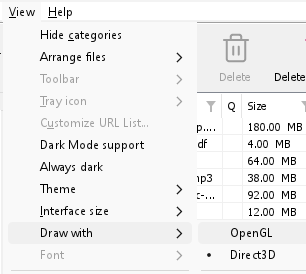
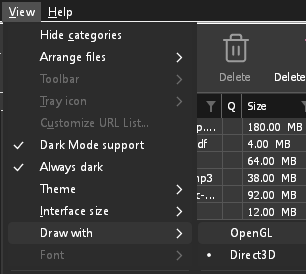
- If Direct3D, Vulkan or Metal can't start on your computer (no driver for it, some virtual machines), or its first window doesn't show within 10 seconds of its own (the time GDM spends loading your list and its icons doesn't count, however slow the computer is just after it starts), GDM draws with OpenGL, and View → Draw with says so and why. Choosing it again tries it again at the next start.
- У Linux Vulkan потребує драйвера Vulkan вашої відеокарти: Mesa's (
mesa-vulkan-driversна Ubuntu та Debian,vulkan-radeonабоvulkan-intelна Arch) для AMD та Intel, власний драйвер NVIDIA для NVIDIA. - If neither can start, GDM draws with a software renderer (Microsoft's on Windows, Mesa's on Linux), so the window still opens (Remote Desktop, a virtual machine without a graphics driver). It works, but keeps the processor busier.
- If the graphics card is reset while GDM runs (a driver update), GDM starts again by itself. Lost twice in 10 minutes, it goes back to OpenGL, and View → Draw with says why.
- Оновлення графічного драйвера з сайту виробника карти (Intel, AMD або NVIDIA) вирішує багато з цих проблем.
- A freeze whose report shows the window thread inside the graphics driver as it shows a frame (
ig4icd64.dllorig9icd64.dllfor Intel,nvoglv64.dllfor NVIDIA,atio6axx.dllfor AMD, underopengl32.dll) is the driver's OpenGL stuck, not GDM: on Windows, choose View → Draw with → Direct3D (the default) and restart GDM, and update the graphics driver. If Draw with says Direct3D didn't start there, the line under it says why. - A freeze or crash report says which one was drawing, on which graphics card and driver, and why that one (chosen, the default, or the other one failing), on its
Drawing with:line near the top: include it when you report a problem. A freeze report also says whether GDM was busy, waiting, or hardly ran at all (a computer too busy to run it); see Crash reports.
The setup or GDM won't start
- Якщо Windows повідомляє Windows захистила ваш ПК, натисніть Докладніше, перевірте, чи файл
MisterDownloadManager-<version>-setup.exeзі сторінки Випуски, потім натисніть Запустити все одно. - GDM runs only once. Starting it again brings the running copy's window to the front. If nothing appears, look for GDM's icon in the notification area.
- Linux, from the AppImage or the tar.gz: if the system lacks a library GDM's window needs (such as
libxkbcommon-x11), GDM names it on the terminal and in a message box, with the command that installs it (sudo apt install libxkbcommon-x11-0, or your distribution's). The .deb and .rpm bring these libraries themselves. In a Wayland session GDM opens its window on Wayland instead. - Linux, the first start is slow: GDM looks up the system's fonts for every script once, all together, while it starts (fontconfig); a first start on a busy computer can take a few seconds more. Install your distribution's Noto fonts if some scripts or symbols show as boxes.
My antivirus or VirusTotal flags GDM
Деякі антивірусні програми позначають нові інсталятори лише тому, що рідко їх бачили, і це найчастіше роблять механізми машинного навчання. На VirusTotal, якщо кілька невеликих механізмів позначають нову програму, а великі залишаються чистими, це зазвичай хибне спрацьовування. Ми повідомляємо про це постачальникам, коли бачимо такі випадки.
Щоб перевірити, чи ваша копія є справжньою:
- Download GDM only from the website or GitHub Releases.
- Отримайте SHA-256 вашого файлу. У Windows запустіть
certutil -hashfile "MisterDownloadManager-0.5.0-setup.exe" SHA256; у Linux —sha256sumта ім'я файлу. - Порівняйте його з рядком того ж файлу у
SHA256SUMS.txtцього випуску.
Якщо вони збігаються, це файл, який ми опублікували. Кожен випуск створюється на GitHub з відкритого вихідного коду, тому кожен може прочитати, що в нього увійшло.
If your antivirus quarantined GDM, restore it and add an exception for its folder. If it flags something other than the setup or GDM's own programs, or a copy from anywhere else, don't run it, and please tell us.
Завантаження HTTPS не вдаються з помилкою «немає сертифікатів» (Linux)
A minimal Linux system (often with the AppImage, the tar.gz or a build from source) may have no CA certificates, which GDM needs to check a secure server. Plain http:// and ftp:// downloads still work; each https:// or ftps:// one stops at once saying the computer has no certificates to check the server with. Install the ca-certificates package (sudo apt install ca-certificates, sudo dnf install ca-certificates), then resume the download. The .deb and .rpm bring it.
Де знаходяться ваші дані
- Встановлено або звичайний zip:
%APPDATA%\misterdownloadmanager. Список і налаштування знаходяться вdownloads.json. - Портативна версія: папка
dataпоруч ізmisterdownloadmanager.exe. - Linux:
~/.local/share/misterdownloadmanager; Mac:~/Library/Application Support/misterdownloadmanager. - Паролі (Входи на сайти, проксі, облікові записи debrid) знаходяться в системному сховищі ключів, а не в
downloads.json; дивіться Параметри → Входи на сайти.
To back up your list, quit GDM (Tasks → Exit) and copy downloads.json.
Оновлення
Help → Check for updates... tells you whether a newer version is out, and what is new in it. Check for updates at every start in that window lets GDM look by itself: a few seconds after it starts, and once a day while it stays open. When there's a new version, its window opens in front.
When there is one, Update now downloads it, checks it, puts it in place and restarts GDM; your list, settings and downloads stay as they are:
| Варіант інсталяції | Що робить Оновити зараз |
|---|---|
| Windows, програма встановлення | Запускає нову програму встановлення без її вікон. Встановлення для всіх користувачів вимагає дозволу адміністратора. |
| Windows, портативна або звичайний zip | Замінює файли програми в папці з нею (папка data портативної копії залишається без змін). |
| Mac | Замінює програму в Програмах. |
| Linux, AppImage або .tar.gz | Замінює AppImage або програми в їхній папці. |
| Linux, пакет .deb або .rpm | Відкриває перевірений пакет у системному інсталяторі пакетів, який запитує ваш пароль. |
| Linux, пакет іншого менеджера пакетів (pacman, ...) | Нічого: вікно про це повідомляє, а оновлення вашої системи приносять нову версію. |
GDM installs an update only when the release's list of checksums is signed by GDM's release key and the file matches it; anything else is refused, and Download opens the Releases page instead. Updating this way starts with version 0.2.1: earlier versions open the Releases page.
AppImage також можна оновити за допомогою інструментів AppImage (AppImageLauncher, Gear Lever, AppImageUpdate): він містить адресу своїх оновлень, і кожен випуск має свій файл .AppImage.zsync, тому ці інструменти завантажують лише ті частини, що змінилися. Це починається з AppImage версії після 0.2.4.
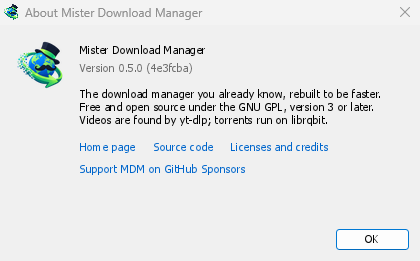
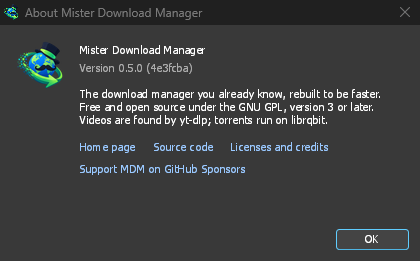
Help → About GolinksPRO Download Manager shows the version you have.
Повідомлення про проблему
Choose Help → Report a problem. It opens the bug report form on GitHub with your GDM version, your system and its version, how GDM was installed and its interface language already filled in. Describe what happened, what you expected and the steps that make it happen. For a download, include the address if you can share it, and the reason shown under Status.
Ви також можете відкрити форму самостійно; вона запитує ті самі деталі.
Наступні кроки
Безкоштовно, з відкритим кодом, без реклами, без пробного періоду.
Download GolinksPRO Download Manager