
Önce ne olduğuna bakın
Her indirme, son olaylarının bir kaydını tutar: yeniden denemeler, yönlendirmeler, sunucunun yanıtları ve hataları.
- Bunları görmek için listedeki indirme Durumunun üzerine gelin.
- Veya ilerleme penceresini açın (bitmemiş bir indirmeye çift tıklayın). Bağlantı tablosu her bağlantının ne yaptığını ve biri başarısız olduğunda nedenini Yeniden deneniyor ile gösterir.
- Dosya Özellikleri (Alt+Enter) Son deneme ve Sonuç bilgilerini gösterir.
İndirme hata veriyor
- Nedeni okuyun (Durum üzerine gelin).
- İndirmeyi seçin ve Sürdür'e tıklayın. Birçok hata, sunucunun veya bağlantının kötü bir an geçirmesinden kaynaklanır.
- Bağlantı süresi dolduysa (oturum açtığınız sitelerden gelen bağlantılar veya içinde zaman sınırı olan bağlantılar için yaygındır), yeni bir tane alın: sağ tıklayın → İndirme adresini yenile. Kesintiye uğramış bir indirmeyi sürdürme bölümüne bakın.
- If it says the file changed on the server, the file isn't the one GDM started with. Right-click → Redownload to start again from the beginning.
- Google Drive bu dosyayı şimdi vermeyecek diyorsa, Drive'ın o dosya için indirme sınırına ulaşılmıştır. Bkz. Google Drive bağlantıları.
İndirme sürdürülmek yerine baştan başlıyor
- Look at Resume capability in the progress window. No means the server can't send a file in parts, so GDM can't continue it later.
- Bazı sunucular aynı dosya için her seferinde yeni bir tarih bildirir. Seçenekler → İndirilenler → Bir indirmeyi sürdürürken dosya değiştirme zamanı değişikliklerini yoksay seçeneğini işaretleyin.
İndirmeler yavaş
- Hız Sınırlayıcı'nın kapalı olduğundan emin olun: İndirilenler → Hız Sınırlayıcı → Kapat. Ayrıca İndirilenler → Hız Sınırlayıcı → Ayarlar... → Tüm indirmeleri birlikte şuna sınırla seçeneğine de bakın, bu sınırlayıcı kapalı olsa bile geçerlidir.
- İndirmenin ilerleme penceresindeki kendi Hız Sınırlayıcı sekmesini kontrol edin.
- Check Options → Connection. A low Default max. conn. number, or an exception for the server, means fewer connections. Rows marked (auto) are servers that refused more connections; GDM can't do more there.
- Zamanlayıcı'daki İndirme sınırları bölümünü kontrol edin. Sınıra ulaşıldığında, indirmeler Bekleniyor: indirme sınırına ulaşıldı (Zamanlayıcı) ile bekler.
The browser doesn't send downloads to GDM
- Was GDM installed with the setup, with Set up browser integration ticked? A portable copy can't take browser downloads. Run the setup again to add it.
- Is the extension loaded and turned on? Look for GolinksPRO Download Manager on the browser's extensions page. In Firefox, install it from addons.mozilla.org: a temporary add-on is gone after a restart. See Browser integration.
- Seçenekler → Genel → Gelişmiş tarayıcı tümleştirmesini kullan açık mı ve tarayıcınız Aşağıdaki tarayıcılardan indirmeleri yakala altında işaretli mi?
- Is the file's type in Options → File types? Only listed types are taken automatically. Download with GolinksPRO Download Manager on the right-click menu takes any link.
- Site, Aşağıdaki sitelerden otomatik olarak indirmeye başlama listesinde mi?
When none of this helps, the browser keeps the download, so nothing is lost. The extension's toolbar button says why it couldn't reach GDM; see The browser and GDM aren't connected.
Zamanlayıcı kuyruğu başlatmadı
- GDM must be running at that time. Closing the window is fine (it stays in the tray); Tasks → Exit is not.
- Saati ayarladıktan sonra Uygula'ya tıkladınız mı?
- Günlük yalnızca işaretli günlerde başlar. Bir kez saat yalnızca belirtilen tarihte başlar.
- Bilgisayar uyku modundayken, kuyrukta Bu kuyruğu çalıştırmak için bilgisayarı uyandır seçeneği işaretli değilse (Windows'ta güç planında Uyandırma zamanlayıcılarına izin ver ayarı gerekir; Zamanlayıcı kapalı olduğunda bunu belirtir) hiçbir şey çalışmaz. Bkz. Kuyruğu çalıştırmak için bilgisayarı uyandır.
Bir video indirilmiyor
Bir video indirilmiyorsa bölümüne bakın.
Magnet bağlantısının açılması uzun sürüyor
A magnet link has to get the torrent's file list from other peers first. That can take a minute or two, and longer for torrents with few peers. If nobody answers in about three minutes, GDM gives up; try again later, or use the .torrent file if the site offers one.
GDM uses a lot of memory
Görev Yöneticisi farklı anlamlara gelen birkaç değer gösterir:
- Memory (on the Processes tab) is what GDM holds for itself alone, its private working set. With the window open and nothing downloading, that is about 70 MB.
- Working set (Details tab, add the column) adds memory shared with other programs. GDM draws its windows with the graphics card, so the graphics driver's memory counts here too, about 120 MB in all.
- Commit size is memory GDM has reserved, whether in use or not.
Closed to the notification area, GDM gives its memory back to Windows: Memory drops to under 10 MB within seconds and stays low while it waits. Downloads, queues and the scheduler go on as before. The list of every language (View → Language) loads fonts for every script while it's open; GDM lets them go when it closes.
Metin çok küçük veya bulanık
GDM keeps Internet Download Manager's compact sizes. On a large or high-resolution screen, choose View → Interface size (125 %, 150 %, 175 % or 200 %), or press Ctrl + and Ctrl − in any GDM window, as in a browser; Ctrl 0 goes back to 100 %. Every window follows at once, and GDM starts at that size next time. It comes on top of Windows' own display scale (Settings → System → Display → Scale).
Bu boyutta ekrandan daha büyük bir pencere (1366 × 768 ekranında yüzde 200'de Seçenekler), ekranın izin verdiği kadar büyük açılır ve geri kalanı kaydırılır: kaydırma çubukları, fare tekerleği veya bir sonraki denetime Tab tuşuyla geçiş yapılabilir.
GDM tells Windows it draws for each monitor's own scale, so Windows never stretches its windows into blur, and it draws Windows' fonts grid-fitted to whole pixels. If the text still looks blurred, tell us your screen's resolution and Windows' display scale when you report it.
Pencere donuyor veya yanlış görüntüleniyor
On Windows, GDM draws its windows with Direct3D 12; on Linux and macOS, with OpenGL, or with Vulkan (Linux) or Metal (macOS) when you choose them. A graphics driver can still misbehave: a window that holds still for seconds, flickers, or shows wrong colours or blocks. Try the other one: choose View → Draw with → OpenGL (or Direct3D, Vulkan, Metal), then quit GDM (Tasks → Exit) and start it again. Choosing the first one goes back the same way.
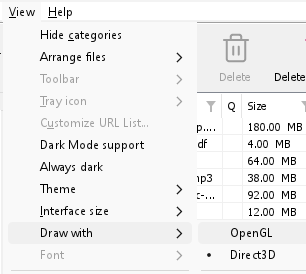
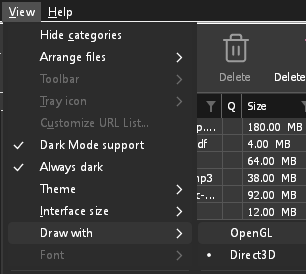
- If Direct3D, Vulkan or Metal can't start on your computer (no driver for it, some virtual machines), or its first window doesn't show within 10 seconds of its own (the time GDM spends loading your list and its icons doesn't count, however slow the computer is just after it starts), GDM draws with OpenGL, and View → Draw with says so and why. Choosing it again tries it again at the next start.
- Linux'ta Vulkan, grafik kartınız için Vulkan sürücüsü gerektirir: AMD ve Intel için Mesa sürücüsü (
mesa-vulkan-driversUbuntu ve Debian'da,vulkan-radeonveyavulkan-intelArch'ta), NVIDIA için NVIDIA'nın kendi sürücüsü. - If neither can start, GDM draws with a software renderer (Microsoft's on Windows, Mesa's on Linux), so the window still opens (Remote Desktop, a virtual machine without a graphics driver). It works, but keeps the processor busier.
- If the graphics card is reset while GDM runs (a driver update), GDM starts again by itself. Lost twice in 10 minutes, it goes back to OpenGL, and View → Draw with says why.
- Grafik sürücüsünü kart üreticisinin (Intel, AMD veya NVIDIA) sitesinden güncellemek bu sorunların çoğunu çözer.
- A freeze whose report shows the window thread inside the graphics driver as it shows a frame (
ig4icd64.dllorig9icd64.dllfor Intel,nvoglv64.dllfor NVIDIA,atio6axx.dllfor AMD, underopengl32.dll) is the driver's OpenGL stuck, not GDM: on Windows, choose View → Draw with → Direct3D (the default) and restart GDM, and update the graphics driver. If Draw with says Direct3D didn't start there, the line under it says why. - A freeze or crash report says which one was drawing, on which graphics card and driver, and why that one (chosen, the default, or the other one failing), on its
Drawing with:line near the top: include it when you report a problem. A freeze report also says whether GDM was busy, waiting, or hardly ran at all (a computer too busy to run it); see Crash reports.
The setup or GDM won't start
- Windows'ta Windows bilgisayarınızı korudu mesajı görünürse Daha fazla bilgi'ye tıklayın, dosyanın
MisterDownloadManager-<version>-setup.exeSürümler sayfasından indirildiğini doğrulayın ve ardından Yine de çalıştır'a tıklayın. - GDM runs only once. Starting it again brings the running copy's window to the front. If nothing appears, look for GDM's icon in the notification area.
- Linux, from the AppImage or the tar.gz: if the system lacks a library GDM's window needs (such as
libxkbcommon-x11), GDM names it on the terminal and in a message box, with the command that installs it (sudo apt install libxkbcommon-x11-0, or your distribution's). The .deb and .rpm bring these libraries themselves. In a Wayland session GDM opens its window on Wayland instead. - Linux, the first start is slow: GDM looks up the system's fonts for every script once, all together, while it starts (fontconfig); a first start on a busy computer can take a few seconds more. Install your distribution's Noto fonts if some scripts or symbols show as boxes.
My antivirus or VirusTotal flags GDM
Bazı antivirüs programları, yeni yükleyicileri nadiren gördükleri için işaretler ve makine öğrenimi motorları bunu en çok yapar. VirusTotal'da, büyük motorlar temiz kalırken birkaç küçük motorun yeni bir kurulumu işaretlemesi genellikle yanlış pozitif bir durumdur. Bunları gördüğümüzde satıcılara bildiriyoruz.
Kopyanızın gerçek olduğunu kontrol etmek için:
- Download GDM only from the website or GitHub Releases.
- Dosyanızın SHA-256'sını alın. Windows'ta
certutil -hashfile "MisterDownloadManager-0.5.0-setup.exe" SHA256çalıştırın; Linux'tasha256sumve dosya adını kullanın. - Bunu, o sürümün
SHA256SUMS.txtdosyasındaki aynı dosyanın satırıyla karşılaştırın.
Eşleşirse, yayımladığımız dosyadır. Her sürüm, GitHub'da genel kaynak kodundan oluşturulur, böylece herkes içine ne girdiğini okuyabilir.
If your antivirus quarantined GDM, restore it and add an exception for its folder. If it flags something other than the setup or GDM's own programs, or a copy from anywhere else, don't run it, and please tell us.
HTTPS indirmeleri "sertifika yok" hatasıyla başarısız oluyor (Linux)
A minimal Linux system (often with the AppImage, the tar.gz or a build from source) may have no CA certificates, which GDM needs to check a secure server. Plain http:// and ftp:// downloads still work; each https:// or ftps:// one stops at once saying the computer has no certificates to check the server with. Install the ca-certificates package (sudo apt install ca-certificates, sudo dnf install ca-certificates), then resume the download. The .deb and .rpm bring it.
Verilerinizin konumu
- Yüklü sürüm veya normal zip:
%APPDATA%\misterdownloadmanager. Liste ve ayarlardownloads.jsoniçinde bulunur. - Taşınabilir sürüm:
misterdownloadmanager.exedosyasının yanındakidataklasörü. - Linux:
~/.local/share/misterdownloadmanager; Mac:~/Library/Application Support/misterdownloadmanager. - Parolalar (Site oturum açma bilgileri, proxy, debrid hesapları)
downloads.jsoniçinde değil, sistemin anahtar zincirindedir; bkz. Seçenekler → Site oturum açma bilgileri.
To back up your list, quit GDM (Tasks → Exit) and copy downloads.json.
Güncelleştirmeler
Help → Check for updates... tells you whether a newer version is out, and what is new in it. Check for updates at every start in that window lets GDM look by itself: a few seconds after it starts, and once a day while it stays open. When there's a new version, its window opens in front.
When there is one, Update now downloads it, checks it, puts it in place and restarts GDM; your list, settings and downloads stay as they are:
| Yüklediğiniz | Şimdi güncelle ne yapar |
|---|---|
| Windows, kurulum | Yeni kurulumu pencereleri göstermeden çalıştırır. Tüm kullanıcılar için yapılan kurulum yönetici izni ister. |
| Windows, taşınabilir veya düz zip | Programları bulundukları klasörde değiştirir (taşınabilir kopyanın data klasörü korunur). |
| Mac | Uygulamayı Applications klasöründe değiştirir. |
| Linux, AppImage veya .tar.gz | AppImage'ı veya programları bulundukları klasörde değiştirir. |
| Linux, .deb veya .rpm | Denetlenen paketi sisteminizin paket yükleyicisinde açar; yükleyici parolanızı ister. |
| Linux, başka bir paket yöneticisinin paketi (pacman, ...) | Hiçbir şey: pencere bunu belirtir ve sisteminizin güncelleştirmeleri yeni sürümü getirir. |
GDM installs an update only when the release's list of checksums is signed by GDM's release key and the file matches it; anything else is refused, and Download opens the Releases page instead. Updating this way starts with version 0.2.1: earlier versions open the Releases page.
AppImage, AppImage araçları (AppImageLauncher, Gear Lever, AppImageUpdate) ile de güncellenebilir: güncellemelerinin adresini taşır ve her sürümün kendi .AppImage.zsync dosyası vardır, bu sayede bu araçlar yalnızca değişen kısımları indirir. Bu, 0.2.4 sürümünden sonraki AppImage ile başlar.
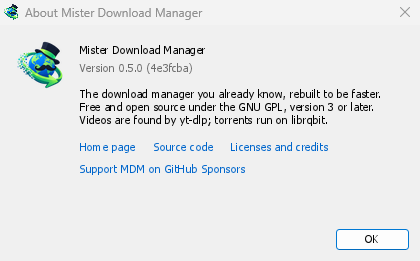
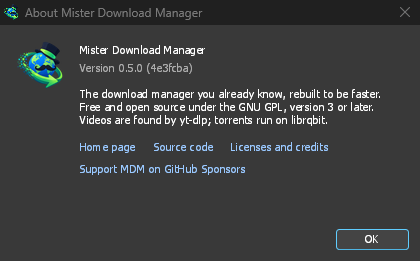
Help → About GolinksPRO Download Manager shows the version you have.
Bir sorun bildirme
Choose Help → Report a problem. It opens the bug report form on GitHub with your GDM version, your system and its version, how GDM was installed and its interface language already filled in. Describe what happened, what you expected and the steps that make it happen. For a download, include the address if you can share it, and the reason shown under Status.
Ayrıca formu kendiniz açabilirsiniz; aynı ayrıntıları ister.
Sonraki adımlar
Ücretsiz, açık kaynak, reklamsız, deneme sürümü yok.
Download GolinksPRO Download Manager