

D’abord, regardez ce qui s’est passé
Chaque téléchargement conserve un journal de ses événements récents : tentatives, redirections, réponses et erreurs du serveur.
- Passez la souris sur l’État du téléchargement dans la liste pour les voir.
- Ou ouvrez sa fenêtre de progression (double-cliquez sur un téléchargement inachevé). Le tableau des connexions montre ce que fait chaque connexion, et Nouvelle tentative avec la raison quand l’une échoue.
- Les Propriétés du fichier (Alt+Entrée) affichent Dernière tentative et son Résultat.
Un téléchargement indique une erreur
- Lisez la raison (passez la souris sur l’État).
- Sélectionnez le téléchargement et cliquez sur Reprendre. Beaucoup d’erreurs sont dues à un serveur ou une connexion qui a un mauvais moment.
- Si le lien a expiré (fréquent pour les liens provenant de sites où vous vous connectez, ou les liens avec une limite de temps), obtenez-en un nouveau : clic droit → Actualiser l’adresse de téléchargement. Voir Reprendre un téléchargement interrompu.
- If it says the file changed on the server, the file isn't the one GDM started with. Right-click → Redownload to start again from the beginning.
- Si le message Google Drive ne fournira pas ce fichier maintenant apparaît, la limite de téléchargement de Drive pour ce fichier a été atteinte. Voir Liens Google Drive.
Un téléchargement recommence au lieu de reprendre
- Look at Resume capability in the progress window. No means the server can't send a file in parts, so GDM can't continue it later.
- Certains serveurs signalent une nouvelle date pour le même fichier à chaque fois. Cochez Options → Téléchargements → Ignorer les changements d’heure de modification du fichier lors de la reprise d’un téléchargement.
Les téléchargements sont lents
- Vérifiez que le Limiteur de vitesse est désactivé : Téléchargements → Limiteur de vitesse → Désactiver. Regardez aussi Téléchargements → Limiteur de vitesse → Paramètres... → Limiter tous les téléchargements ensemble à, ce qui s’applique même avec le limiteur désactivé.
- Vérifiez l’onglet Limiteur de vitesse du téléchargement dans sa fenêtre de progression.
- Check Options → Connection. A low Default max. conn. number, or an exception for the server, means fewer connections. Rows marked (auto) are servers that refused more connections; GDM can't do more there.
- Vérifiez les Limites de téléchargement dans le Planificateur. Lorsque la limite est atteinte, les téléchargements attendent avec En attente : la limite de téléchargement est atteinte (Planificateur).
The browser doesn't send downloads to GDM
- Was GDM installed with the setup, with Set up browser integration ticked? A portable copy can't take browser downloads. Run the setup again to add it.
- Is the extension loaded and turned on? Look for GolinksPRO Download Manager on the browser's extensions page. In Firefox, install it from addons.mozilla.org: a temporary add-on is gone after a restart. See Browser integration.
- L’option Options → Général → Utiliser l’intégration avancée du navigateur est-elle activée, et votre navigateur coché sous Capturer les téléchargements des navigateurs suivants ?
- Is the file's type in Options → File types? Only listed types are taken automatically. Download with GolinksPRO Download Manager on the right-click menu takes any link.
- Le site est-il dans Ne pas démarrer automatiquement le téléchargement depuis les sites suivants ?
When none of this helps, the browser keeps the download, so nothing is lost. The extension's toolbar button says why it couldn't reach GDM; see The browser and GDM aren't connected.
Le Planificateur n’a pas démarré la file d’attente
- GDM must be running at that time. Closing the window is fine (it stays in the tray); Tasks → Exit is not.
- Avez-vous cliqué sur Appliquer après avoir réglé l’heure ?
- Quotidien ne démarre que les jours cochés. Une fois à ne démarre qu’à cette date.
- Un ordinateur en veille n’exécute rien tant qu’il n’est pas réactivé, sauf si la case Réveiller l’ordinateur pour exécuter cette file d’attente est cochée (sous Windows, il faut Autoriser les minuteurs de sortie de veille dans le plan d’alimentation ; le Planificateur indique quand il est désactivé). Voir Réveiller l’ordinateur pour exécuter une file d’attente.
Une vidéo ne se télécharge pas
Voir Si une vidéo ne se télécharge pas.
Un lien magnet est long à démarrer
A magnet link has to get the torrent's file list from other peers first. That can take a minute or two, and longer for torrents with few peers. If nobody answers in about three minutes, GDM gives up; try again later, or use the .torrent file if the site offers one.
GDM uses a lot of memory
Le Gestionnaire des tâches affiche plusieurs chiffres, qui signifient différentes choses :
- Memory (on the Processes tab) is what GDM holds for itself alone, its private working set. With the window open and nothing downloading, that is about 70 MB.
- Working set (Details tab, add the column) adds memory shared with other programs. GDM draws its windows with the graphics card, so the graphics driver's memory counts here too, about 120 MB in all.
- Commit size is memory GDM has reserved, whether in use or not.
Closed to the notification area, GDM gives its memory back to Windows: Memory drops to under 10 MB within seconds and stays low while it waits. Downloads, queues and the scheduler go on as before. The list of every language (View → Language) loads fonts for every script while it's open; GDM lets them go when it closes.
Le texte est trop petit ou flou
GDM keeps Internet Download Manager's compact sizes. On a large or high-resolution screen, choose View → Interface size (125 %, 150 %, 175 % or 200 %), or press Ctrl + and Ctrl − in any GDM window, as in a browser; Ctrl 0 goes back to 100 %. Every window follows at once, and GDM starts at that size next time. It comes on top of Windows' own display scale (Settings → System → Display → Scale).
Une fenêtre plus grande que l’écran à cette taille (Options à 200 % sur un écran 1366 × 768) s’ouvre aussi grande que l’écran le permet, et le reste défile : avec les barres de défilement, la molette de la souris, ou Tab pour passer au contrôle suivant.
GDM tells Windows it draws for each monitor's own scale, so Windows never stretches its windows into blur, and it draws Windows' fonts grid-fitted to whole pixels. If the text still looks blurred, tell us your screen's resolution and Windows' display scale when you report it.
La fenêtre se fige ou s'affiche mal
On Windows, GDM draws its windows with Direct3D 12; on Linux and macOS, with OpenGL, or with Vulkan (Linux) or Metal (macOS) when you choose them. A graphics driver can still misbehave: a window that holds still for seconds, flickers, or shows wrong colours or blocks. Try the other one: choose View → Draw with → OpenGL (or Direct3D, Vulkan, Metal), then quit GDM (Tasks → Exit) and start it again. Choosing the first one goes back the same way.
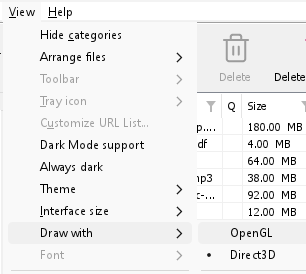
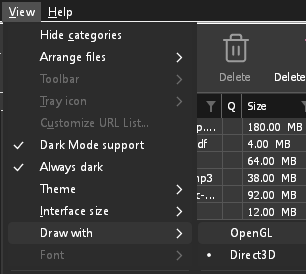
- If Direct3D, Vulkan or Metal can't start on your computer (no driver for it, some virtual machines), or its first window doesn't show within 10 seconds of its own (the time GDM spends loading your list and its icons doesn't count, however slow the computer is just after it starts), GDM draws with OpenGL, and View → Draw with says so and why. Choosing it again tries it again at the next start.
- Sous Linux, Vulkan nécessite le pilote Vulkan de votre carte graphique : celui de Mesa (
mesa-vulkan-driverssur Ubuntu et Debian,vulkan-radeonouvulkan-intelsur Arch) pour AMD et Intel, le pilote propriétaire de NVIDIA pour NVIDIA. - If neither can start, GDM draws with a software renderer (Microsoft's on Windows, Mesa's on Linux), so the window still opens (Remote Desktop, a virtual machine without a graphics driver). It works, but keeps the processor busier.
- If the graphics card is reset while GDM runs (a driver update), GDM starts again by itself. Lost twice in 10 minutes, it goes back to OpenGL, and View → Draw with says why.
- La mise à jour du pilote graphique depuis le site du fabricant de la carte (Intel, AMD ou NVIDIA) résout bon nombre de ces problèmes.
- A freeze whose report shows the window thread inside the graphics driver as it shows a frame (
ig4icd64.dllorig9icd64.dllfor Intel,nvoglv64.dllfor NVIDIA,atio6axx.dllfor AMD, underopengl32.dll) is the driver's OpenGL stuck, not GDM: on Windows, choose View → Draw with → Direct3D (the default) and restart GDM, and update the graphics driver. If Draw with says Direct3D didn't start there, the line under it says why. - A freeze or crash report says which one was drawing, on which graphics card and driver, and why that one (chosen, the default, or the other one failing), on its
Drawing with:line near the top: include it when you report a problem. A freeze report also says whether GDM was busy, waiting, or hardly ran at all (a computer too busy to run it); see Crash reports.
The setup or GDM won't start
- Si Windows affiche Windows a protégé votre PC, cliquez sur Plus d'informations, vérifiez que le fichier provient bien
MisterDownloadManager-<version>-setup.exede la page Versions, puis cliquez sur Exécuter quand même. - GDM runs only once. Starting it again brings the running copy's window to the front. If nothing appears, look for GDM's icon in the notification area.
- Linux, from the AppImage or the tar.gz: if the system lacks a library GDM's window needs (such as
libxkbcommon-x11), GDM names it on the terminal and in a message box, with the command that installs it (sudo apt install libxkbcommon-x11-0, or your distribution's). The .deb and .rpm bring these libraries themselves. In a Wayland session GDM opens its window on Wayland instead. - Linux, the first start is slow: GDM looks up the system's fonts for every script once, all together, while it starts (fontconfig); a first start on a busy computer can take a few seconds more. Install your distribution's Noto fonts if some scripts or symbols show as boxes.
My antivirus or VirusTotal flags GDM
Quelques programmes antivirus signalent les nouveaux installateurs simplement parce qu'ils les ont rarement vus, et les moteurs d'apprentissage automatique le font le plus souvent. Sur VirusTotal, une poignée de petits moteurs signalant une nouvelle installation tandis que les grands restent propres est généralement un faux positif. Nous les signalons aux fournisseurs lorsque nous les voyons.
Pour vérifier que votre copie est la bonne :
- Download GDM only from the website or GitHub Releases.
- Obtenez le SHA-256 de votre fichier. Sous Windows, exécutez
certutil -hashfile "MisterDownloadManager-0.5.0-setup.exe" SHA256; sous Linux,sha256sumet le nom du fichier. - Comparez-le avec la ligne du même fichier dans le
SHA256SUMS.txtde cette version.
S'ils correspondent, c'est le fichier que nous avons publié. Chaque version est construite sur GitHub à partir du code source public, afin que chacun puisse lire ce qu'il contient.
If your antivirus quarantined GDM, restore it and add an exception for its folder. If it flags something other than the setup or GDM's own programs, or a copy from anywhere else, don't run it, and please tell us.
Les téléchargements HTTPS échouent avec « aucun certificat » (Linux)
A minimal Linux system (often with the AppImage, the tar.gz or a build from source) may have no CA certificates, which GDM needs to check a secure server. Plain http:// and ftp:// downloads still work; each https:// or ftps:// one stops at once saying the computer has no certificates to check the server with. Install the ca-certificates package (sudo apt install ca-certificates, sudo dnf install ca-certificates), then resume the download. The .deb and .rpm bring it.
Où sont vos données
- Installé ou zip simple :
%APPDATA%\misterdownloadmanager. La liste et les paramètres se trouvent dansdownloads.json. - Portable : le dossier
dataà côté demisterdownloadmanager.exe. - Linux :
~/.local/share/misterdownloadmanager; Mac :~/Library/Application Support/misterdownloadmanager. - Les mots de passe (Connexions aux sites, le proxy, les comptes de débridage) se trouvent dans le trousseau du système, pas dans
downloads.json; voir Options → Connexions aux sites.
To back up your list, quit GDM (Tasks → Exit) and copy downloads.json.
Mises à jour
Help → Check for updates... tells you whether a newer version is out, and what is new in it. Check for updates at every start in that window lets GDM look by itself: a few seconds after it starts, and once a day while it stays open. When there's a new version, its window opens in front.
When there is one, Update now downloads it, checks it, puts it in place and restarts GDM; your list, settings and downloads stay as they are:
| Vous avez installé | Fonctionnement de « Mettre à jour maintenant » |
|---|---|
| Windows, programme d’installation | Lance le nouveau programme d’installation sans afficher ses fenêtres. Une installation pour tous les utilisateurs demande l’autorisation de l’administrateur. |
| Windows, version portable ou archive ZIP | Remplace les programmes dans leur dossier (le dossier data d'une copie portable est conservé). |
| Mac | Remplace l'application dans Applications. |
| Linux, l'AppImage ou le .tar.gz | Remplace l'AppImage, ou les programmes dans leur dossier. |
| Linux, le .deb ou .rpm | Ouvre le paquet vérifié dans le programme d’installation de paquets de votre système, qui vous demande votre mot de passe. |
| Linux, un paquet d’un autre gestionnaire de paquets (pacman, ...) | Rien : la fenêtre l’indique, et les mises à jour de votre système apportent la nouvelle version. |
GDM installs an update only when the release's list of checksums is signed by GDM's release key and the file matches it; anything else is refused, and Download opens the Releases page instead. Updating this way starts with version 0.2.1: earlier versions open the Releases page.
L’AppImage peut aussi être mise à jour avec des outils AppImage (AppImageLauncher, Gear Lever, AppImageUpdate) : elle contient l’adresse de ses mises à jour et chaque version possède son fichier .AppImage.zsync. Ces outils ne téléchargent donc que les parties modifiées. Cette possibilité est disponible à partir de l’AppImage de la version qui suit la 0.2.4.
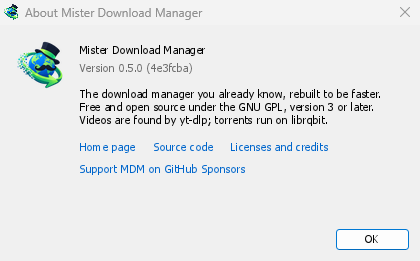
Help → About GolinksPRO Download Manager shows the version you have.
Signaler un problème
Choose Help → Report a problem. It opens the bug report form on GitHub with your GDM version, your system and its version, how GDM was installed and its interface language already filled in. Describe what happened, what you expected and the steps that make it happen. For a download, include the address if you can share it, and the reason shown under Status.
Vous pouvez aussi ouvrir le formulaire vous-même ; il vous demande les mêmes renseignements.
Étapes suivantes
- Reprendre un téléchargement interrompu →
- Intégration au navigateur →
- Retour à l’index de la documentation →
Gratuit, open source, sans publicité ni période d’essai.
Download GolinksPRO Download Manager