

If GolinksPRO Download Manager closes unexpectedly or stops responding, a crash report window opens. It shows what happened, lets you read the whole report, and can send it to the developers on GitHub. Each report helps fix the problem for everyone.
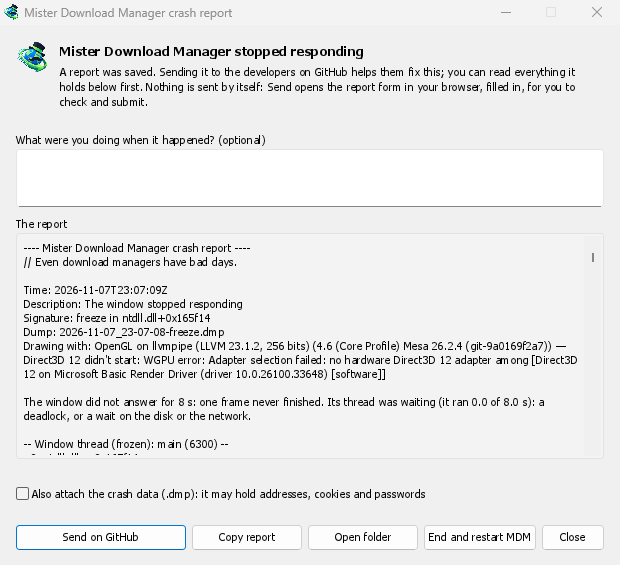
Ce que vous voyez
- GolinksPRO Download Manager closed unexpectedly: GDM crashed, or hit an internal error and closed.
- GolinksPRO Download Manager stopped responding: its window didn't answer for 8 seconds. GDM is still running, frozen. End and restart GDM closes the frozen copy and starts a new one. If GDM answers again by itself, the window says so.
Dans la fenêtre :
- Que faisiez-vous quand c’est arrivé ? est une question facultative. Quelques mots, comme « J’ai ouvert Ajouter une URL », sont d’une grande aide.
- Le rapport montre tout ce qui serait envoyé. Lisez-le d’abord si vous le souhaitez.
- Envoyer sur GitHub ouvre le formulaire Rapport d’erreur de GitHub dans votre navigateur, déjà rempli, ainsi que le dossier qui contient le rapport. Faites glisser le fichier du rapport dans le formulaire, vérifiez-le et soumettez-le. Vous avez besoin d’un compte GitHub. Rien n’est envoyé automatiquement.
- Si quelqu’un a déjà signalé le même problème, la fenêtre l’indique (Déjà signalé comme problème #…). Ouvrir le problème signalé ouvre le problème et copie votre rapport dans le presse-papiers, afin que vous puissiez l’ajouter en commentaire.
The other buttons copy the report, open its folder, or start GDM again.
Contenu d’un rapport
- What happened: the error and the place in GDM's code where it happened.
- The stack: the place in GDM's code where it crashed or froze, and what every other part of it was doing.
- GDM's recent log: for example "command AddUrl" or "window opened: add-url".
- The system: GDM's version and how you installed it, your operating system and its version, the processor, the language and theme, and how many downloads and queues you have. These are counts only.
Il ne contient pas :
- vos adresses de téléchargement ni les noms de vos fichiers ;
- votre nom d’utilisateur, qui s’affiche comme
~dans les chemins de dossiers.
Si un message d’erreur cite quelque chose que vous avez tapé, ce texte figure dans le rapport. Lisez-le donc avant de l’envoyer.
The crash data file (.dmp) is a snapshot of what GDM was running at that moment. It helps the developers most, but it can hold pieces of what GDM had in memory, such as download addresses, cookies and saved passwords. It is only attached when you tick Also attach the crash data.
Où les rapports sont conservés
In GDM's data folder:
crashes\: chaque rapport (.txt) et ses données de plantage (.dmp) ;logs\: GDM's log (mdm.log, with older ones asmdm.1.logand so on, 2 MB each).
GDM's data folder is %APPDATA%\misterdownloadmanager on Windows, ~/Library/Application Support/misterdownloadmanager on macOS, and ~/.local/share/misterdownloadmanager on Linux. In portable mode it is the data folder next to the program.
The log records what GDM does, so a report can show what led to a problem. To log more detail, start GDM with the environment variable MDM_LOG=debug.
Pour les développeurs
How it works: a second copy of GDM, the monitor, starts beside it with --crash-monitor. The crash code lives in crates/crash and crates/app/src/crash.rs.
- Catching problems. When GDM crashes (a Windows exception, a signal on Linux, a Mach exception on macOS), panics, or freezes, it asks the monitor for a dump. A freeze is a frame of the window running more than 8 s, seen by a watchdog thread that ignores time spent asleep. It times both parts of a frame: what GDM handles (the commands that come in, the clock of downloads, queues and the Scheduler), which runs minimized too, and the drawing; never the wait between frames. The watchdog also measures how much processor time the window thread got meanwhile, and the report says what that means: it ran all along (a loop), it waited in a lock or on I/O (a deadlock), or it hardly ran in ordinary code, which is a computer too busy to run GDM or slow to load it from disk, most likely not GDM's bug (those share one signature,
freeze while the computer was busy). When the window thread is already back in the event loop by the time the dump is written, the freeze was over before the snapshot, so its stack can't explain it; those reports say so and share the signaturefreeze over before the snapshot. macOS doesn't measure it yet. The monitor then writes a minidump of every thread from outside, throughminidumperandcrash-handler. A crashed process never writes its own dump, which is how Firefox, Crashpad and Sentry do it too. - Lecture du dump. Le moniteur lit le dump avec
rust-minidumpde Mozilla. Il utilise les symboles Breakpad de la version s'ils sont trouvés. Une version compilée à partir des sources peut aussi lire les informations de débogage natives à côté (son.pdb, DWARF) si elle est compilée avec--features mdm-crash/native-symbols; l'application livrée est sans ce lecteur, qui pèse plusieurs Mo. La Signature du rapport (par exemplefreeze in misterdownloadmanager::winui::combo_edit) reste la même pour tous les rapports d'un même problème, et la fenêtre recherche les problèmes existants avec elle. - Symboles. Les versions de publication conservent les tables de lignes (
debug = "line-tables-only"), mais aucun téléchargement n'inclut les informations de débogage. L'intégration continue les transforme enMisterDownloadManager-<version>-symbols-<platform>.zip(tools/installer/symbols.py, en utilisantdump_symsde Mozilla), publiés à côté des autres fichiers de la version. La fenêtre de rapport récupère le zip pour sa propre version lorsqu'une pile affiche des adresses brutes. - Un
.dmpd'un problème :
cargo run -p mdm-crash --bin mdm-symbolicate -- crash.dmp MisterDownloadManager-<version>-symbols-windows-x64.zip
- Testing it.
cargo test -p mdm-crashruns a real freeze, panic and crash (examples/crashy.rs) and checks each report's signature. To try it in the app, start GDM withMDM_CRASH_TEST=1, then runmisterdownloadmanager /show crash-test:freeze(a deadlock; orspin, 12 s of a busy window thread,panic,crash,abort).cargo test -p mdm-app --test freeze_report -- --ignoreddoes that in a copy of the app off the screens, its window visible and minimized.
Gratuit, open source, sans publicité ni période d’essai.
Download GolinksPRO Download Manager