

If GolinksPRO Download Manager closes unexpectedly or stops responding, a crash report window opens. It shows what happened, lets you read the whole report, and can send it to the developers on GitHub. Each report helps fix the problem for everyone.
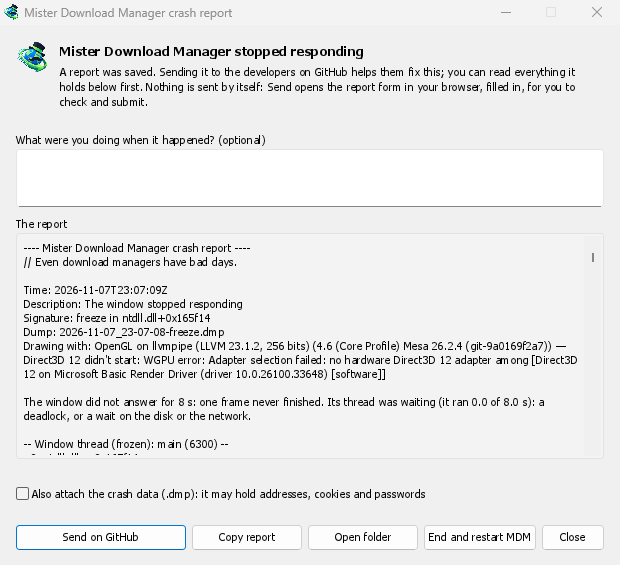
آنچه میبینید
- GolinksPRO Download Manager closed unexpectedly: GDM crashed, or hit an internal error and closed.
- GolinksPRO Download Manager stopped responding: its window didn't answer for 8 seconds. GDM is still running, frozen. End and restart GDM closes the frozen copy and starts a new one. If GDM answers again by itself, the window says so.
در پنجره:
- هنگام وقوع این مشکل چه کاری انجام میدادید؟ اختیاری است. نوشتن چند کلمه، مانند «من گزینه افزودن URL را باز کردم»، بسیار کمک میکند.
- گزارش هر آنچه را که ارسال میشود نشان میدهد. اگر دوست دارید، ابتدا آن را بخوانید.
- ارسال در GitHub فرم گزارش خرابی در GitHub را که از قبل پر شده است، همراه با پوشه حاوی گزارش، در مرورگرتان باز میکند. فایل گزارش را به فرم بکشید، آن را بررسی کنید و فرم را ارسال کنید. برای این کار به حساب GitHub نیاز دارید. هیچ چیزی بهطور خودکار ارسال نمیشود.
- اگر کسی قبلا همان مشکل را گزارش کرده باشد، پنجره این موضوع را اعلام میکند (قبلا به عنوان مشکل #… گزارش شده است). باز کردن مشکل گزارششده آن را باز میکند و گزارش شما را در کلیپبورد قرار میدهد، بنابراین میتوانید آن را به عنوان یک نظر اضافه کنید.
The other buttons copy the report, open its folder, or start GDM again.
یک گزارش شامل چه چیزهایی است
- What happened: the error and the place in GDM's code where it happened.
- The stack: the place in GDM's code where it crashed or froze, and what every other part of it was doing.
- GDM's recent log: for example "command AddUrl" or "window opened: add-url".
- The system: GDM's version and how you installed it, your operating system and its version, the processor, the language and theme, and how many downloads and queues you have. These are counts only.
این گزارش شامل موارد زیر نیست:
- آدرسهای دانلود یا نام فایلهای شما؛
- نام کاربری شما، که به صورت
~در مسیرهای پوشه نمایش داده میشود.
اگر یک پیام خطا چیزی را که شما تایپ کردهاید نقل قول کند، آن متن در گزارش موجود است، بنابراین قبل از ارسال آن را بخوانید.
The crash data file (.dmp) is a snapshot of what GDM was running at that moment. It helps the developers most, but it can hold pieces of what GDM had in memory, such as download addresses, cookies and saved passwords. It is only attached when you tick Also attach the crash data.
محل نگهداری گزارشها
In GDM's data folder:
crashes\: هر گزارش (.txt) و داده خرابی آن (.dmp)؛logs\: GDM's log (mdm.log, with older ones asmdm.1.logand so on, 2 MB each).
GDM's data folder is %APPDATA%\misterdownloadmanager on Windows, ~/Library/Application Support/misterdownloadmanager on macOS, and ~/.local/share/misterdownloadmanager on Linux. In portable mode it is the data folder next to the program.
The log records what GDM does, so a report can show what led to a problem. To log more detail, start GDM with the environment variable MDM_LOG=debug.
برای توسعهدهندگان
How it works: a second copy of GDM, the monitor, starts beside it with --crash-monitor. The crash code lives in crates/crash and crates/app/src/crash.rs.
- Catching problems. When GDM crashes (a Windows exception, a signal on Linux, a Mach exception on macOS), panics, or freezes, it asks the monitor for a dump. A freeze is a frame of the window running more than 8 s, seen by a watchdog thread that ignores time spent asleep. It times both parts of a frame: what GDM handles (the commands that come in, the clock of downloads, queues and the Scheduler), which runs minimized too, and the drawing; never the wait between frames. The watchdog also measures how much processor time the window thread got meanwhile, and the report says what that means: it ran all along (a loop), it waited in a lock or on I/O (a deadlock), or it hardly ran in ordinary code, which is a computer too busy to run GDM or slow to load it from disk, most likely not GDM's bug (those share one signature,
freeze while the computer was busy). When the window thread is already back in the event loop by the time the dump is written, the freeze was over before the snapshot, so its stack can't explain it; those reports say so and share the signaturefreeze over before the snapshot. macOS doesn't measure it yet. The monitor then writes a minidump of every thread from outside, throughminidumperandcrash-handler. A crashed process never writes its own dump, which is how Firefox, Crashpad and Sentry do it too. - خواندن فایل دامپ. مانیتور فایل دامپ را با
rust-minidumpموزیلا میخواند. اگر نمادهای Breakpad نسخه منتشرشده پیدا شوند، از آنها استفاده میکند. نسخهای که از کد منبع ساخته شده باشد نیز میتواند اطلاعات اشکالزدایی بومی را که در کنار آن قرار دارد (.pdb، DWARF) بخواند، اگر با--features mdm-crash/native-symbolsساخته شده باشد؛ برنامه منتشرشده بدون این خواننده عرضه میشود که چند مگابایت حجم دارد. امضای گزارش (برای مثالfreeze in misterdownloadmanager::winui::combo_edit) در گزارشهای مربوط به یک مشکل ثابت میماند و پنجره، مسئلههای موجود را برای یافتن آن جستوجو میکند. - نمادها. نسخههای منتشرشده جدولهای خط (
debug = "line-tables-only") را نگه میدارند، اما هیچ بارگیریای شامل اطلاعات اشکالزدایی نیست. CI آن را بهMisterDownloadManager-<version>-symbols-<platform>.zip(tools/installer/symbols.py، با استفاده ازdump_symsموزیلا) تبدیل میکند و در کنار سایر فایلهای نسخه منتشرشده قرار میدهد. وقتی پشته فراخوانی فقط نشانیهای خام را نشان میدهد، پنجره گزارش فایل فشرده مربوط به نسخه خود را دریافت میکند. .dmpاز یک مسئله:
cargo run -p mdm-crash --bin mdm-symbolicate -- crash.dmp MisterDownloadManager-<version>-symbols-windows-x64.zip
- Testing it.
cargo test -p mdm-crashruns a real freeze, panic and crash (examples/crashy.rs) and checks each report's signature. To try it in the app, start GDM withMDM_CRASH_TEST=1, then runmisterdownloadmanager /show crash-test:freeze(a deadlock; orspin, 12 s of a busy window thread,panic,crash,abort).cargo test -p mdm-app --test freeze_report -- --ignoreddoes that in a copy of the app off the screens, its window visible and minimized.
رایگان، متنباز، بدون تبلیغات، بدون دوره آزمایشی.
Download GolinksPRO Download Manager