

If GolinksPRO Download Manager closes unexpectedly or stops responding, a crash report window opens. It shows what happened, lets you read the whole report, and can send it to the developers on GitHub. Each report helps fix the problem for everyone.
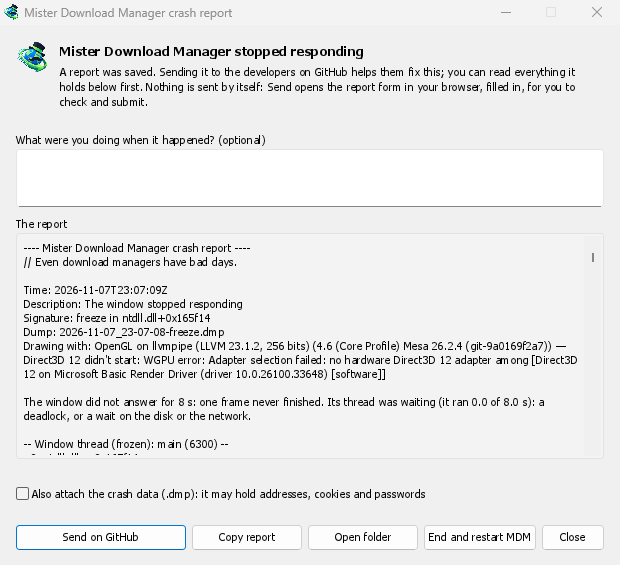
Apa yang Anda lihat
- GolinksPRO Download Manager closed unexpectedly: GDM crashed, or hit an internal error and closed.
- GolinksPRO Download Manager stopped responding: its window didn't answer for 8 seconds. GDM is still running, frozen. End and restart GDM closes the frozen copy and starts a new one. If GDM answers again by itself, the window says so.
Di jendela:
- Apa yang Anda lakukan saat itu terjadi? bersifat opsional. Beberapa kata, seperti "Saya membuka Tambah URL", sangat membantu.
- Laporan menunjukkan semua yang akan dikirim. Bacalah terlebih dahulu jika Anda mau.
- Kirim di GitHub membuka formulir Laporan crash GitHub di browser Anda. Formulir sudah terisi dan disertai folder yang berisi laporan. Seret file laporan ke formulir, periksa, lalu kirim. Anda memerlukan akun GitHub. Tidak ada yang dikirim secara otomatis.
- Jika seseorang sudah melaporkan masalah yang sama, jendela akan mengatakannya (Sudah dilaporkan sebagai masalah #…). Buka masalah yang dilaporkan membukanya dan menempatkan laporan Anda di papan klip, sehingga Anda dapat menambahkannya sebagai komentar.
The other buttons copy the report, open its folder, or start GDM again.
Apa yang terkandung dalam laporan
- What happened: the error and the place in GDM's code where it happened.
- The stack: the place in GDM's code where it crashed or froze, and what every other part of it was doing.
- GDM's recent log: for example "command AddUrl" or "window opened: add-url".
- The system: GDM's version and how you installed it, your operating system and its version, the processor, the language and theme, and how many downloads and queues you have. These are counts only.
Ini tidak berisi:
- alamat unduhan atau nama file Anda;
- nama pengguna Anda, yang ditampilkan sebagai
~di jalur folder.
Jika pesan kesalahan mengutip sesuatu yang Anda ketik, teks itu ada dalam laporan, jadi bacalah sebelum mengirim.
The crash data file (.dmp) is a snapshot of what GDM was running at that moment. It helps the developers most, but it can hold pieces of what GDM had in memory, such as download addresses, cookies and saved passwords. It is only attached when you tick Also attach the crash data.
Tempat laporan disimpan
In GDM's data folder:
crashes\: setiap laporan (.txt) dan data kerusakannya (.dmp);logs\: GDM's log (mdm.log, with older ones asmdm.1.logand so on, 2 MB each).
GDM's data folder is %APPDATA%\misterdownloadmanager on Windows, ~/Library/Application Support/misterdownloadmanager on macOS, and ~/.local/share/misterdownloadmanager on Linux. In portable mode it is the data folder next to the program.
The log records what GDM does, so a report can show what led to a problem. To log more detail, start GDM with the environment variable MDM_LOG=debug.
Untuk pengembang
How it works: a second copy of GDM, the monitor, starts beside it with --crash-monitor. The crash code lives in crates/crash and crates/app/src/crash.rs.
- Catching problems. When GDM crashes (a Windows exception, a signal on Linux, a Mach exception on macOS), panics, or freezes, it asks the monitor for a dump. A freeze is a frame of the window running more than 8 s, seen by a watchdog thread that ignores time spent asleep. It times both parts of a frame: what GDM handles (the commands that come in, the clock of downloads, queues and the Scheduler), which runs minimized too, and the drawing; never the wait between frames. The watchdog also measures how much processor time the window thread got meanwhile, and the report says what that means: it ran all along (a loop), it waited in a lock or on I/O (a deadlock), or it hardly ran in ordinary code, which is a computer too busy to run GDM or slow to load it from disk, most likely not GDM's bug (those share one signature,
freeze while the computer was busy). When the window thread is already back in the event loop by the time the dump is written, the freeze was over before the snapshot, so its stack can't explain it; those reports say so and share the signaturefreeze over before the snapshot. macOS doesn't measure it yet. The monitor then writes a minidump of every thread from outside, throughminidumperandcrash-handler. A crashed process never writes its own dump, which is how Firefox, Crashpad and Sentry do it too. - Membaca dump. Monitor membaca dump dengan
rust-minidumpdari Mozilla. Monitor menggunakan simbol Breakpad untuk rilis jika tersedia. Build dari kode sumber juga dapat membaca info debug native di sebelahnya (.pdb, DWARF) jika dibangun dengan--features mdm-crash/native-symbols; aplikasi yang dirilis tidak menyertakan pembaca tersebut karena ukurannya beberapa MB. Tanda tangan laporan (misalnyafreeze in misterdownloadmanager::winui::combo_edit) tetap sama untuk semua laporan tentang masalah yang sama, dan jendela mencari masalah yang sudah ada dengan tanda tangan tersebut. - Simbol. Build rilis menyertakan tabel baris (
debug = "line-tables-only"), tetapi tidak ada unduhan yang menyertakan info debug. CI mengubahnya menjadiMisterDownloadManager-<version>-symbols-<platform>.zip(tools/installer/symbols.py, menggunakandump_symsdari Mozilla), lalu menerbitkannya bersama file rilis lainnya. Jendela laporan mengambil file zip untuk versi yang sama ketika tumpukan menunjukkan alamat tanpa simbol. .dmpdari suatu masalah:
cargo run -p mdm-crash --bin mdm-symbolicate -- crash.dmp MisterDownloadManager-<version>-symbols-windows-x64.zip
- Testing it.
cargo test -p mdm-crashruns a real freeze, panic and crash (examples/crashy.rs) and checks each report's signature. To try it in the app, start GDM withMDM_CRASH_TEST=1, then runmisterdownloadmanager /show crash-test:freeze(a deadlock; orspin, 12 s of a busy window thread,panic,crash,abort).cargo test -p mdm-app --test freeze_report -- --ignoreddoes that in a copy of the app off the screens, its window visible and minimized.
Gratis, sumber terbuka, tanpa iklan, tanpa masa uji coba.
Download GolinksPRO Download Manager