

If GolinksPRO Download Manager closes unexpectedly or stops responding, a crash report window opens. It shows what happened, lets you read the whole report, and can send it to the developers on GitHub. Each report helps fix the problem for everyone.
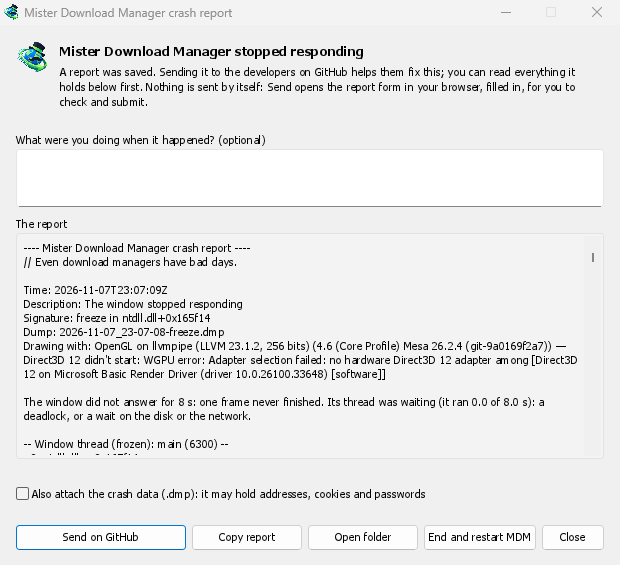
आप क्या देखते हैं
- GolinksPRO Download Manager closed unexpectedly: GDM crashed, or hit an internal error and closed.
- GolinksPRO Download Manager stopped responding: its window didn't answer for 8 seconds. GDM is still running, frozen. End and restart GDM closes the frozen copy and starts a new one. If GDM answers again by itself, the window says so.
विंडो में:
- ऐसा होने पर आप क्या कर रहे थे? यह बताना ज़रूरी नहीं है। कुछ शब्द, जैसे “मैंने URL जोड़ें खोला”, बहुत मददगार होते हैं।
- रिपोर्ट में वह सब दिखता है जो भेजा जाएगा। चाहें तो पहले इसे पढ़ लें।
- GitHub पर भेजें आपके ब्राउज़र में GitHub का क्रैश रिपोर्ट फ़ॉर्म खोलता है, जो पहले से भरा होता है। साथ ही, रिपोर्ट वाली फ़ोल्डर भी खुलती है। रिपोर्ट की फ़ाइल को फ़ॉर्म में खींचें, उसे जाँचें और सबमिट करें। इसके लिए GitHub खाता होना ज़रूरी है। कुछ भी अपने आप नहीं भेजा जाता।
- यदि किसी ने पहले ही इसी समस्या की रिपोर्ट की है, तो विंडो में इसकी सूचना दी जाती है (इसकी रिपोर्ट पहले ही समस्या #… के रूप में की जा चुकी है)। रिपोर्ट की गई समस्या खोलें उसे खोलता है और आपकी रिपोर्ट को क्लिपबोर्ड पर कॉपी करता है, ताकि आप उसे टिप्पणी के रूप में जोड़ सकें।
The other buttons copy the report, open its folder, or start GDM again.
एक रिपोर्ट में क्या होता है
- What happened: the error and the place in GDM's code where it happened.
- The stack: the place in GDM's code where it crashed or froze, and what every other part of it was doing.
- GDM's recent log: for example "command AddUrl" or "window opened: add-url".
- The system: GDM's version and how you installed it, your operating system and its version, the processor, the language and theme, and how many downloads and queues you have. These are counts only.
इसमें ये नहीं होते:
- आपके डाउनलोड पते या फ़ाइल नाम;
- आपका उपयोगकर्ता नाम, जो फ़ोल्डर पथों में
~के रूप में दिखता है।
यदि किसी त्रुटि संदेश में आपके लिखे हुए शब्द उद्धृत हों, तो वे रिपोर्ट में शामिल होते हैं। इसलिए भेजने से पहले रिपोर्ट पढ़ लें।
The crash data file (.dmp) is a snapshot of what GDM was running at that moment. It helps the developers most, but it can hold pieces of what GDM had in memory, such as download addresses, cookies and saved passwords. It is only attached when you tick Also attach the crash data.
रिपोर्ट कहाँ रखी जाती हैं
In GDM's data folder:
crashes\: हर रिपोर्ट (.txt) और उसका क्रैश डेटा (.dmp);logs\: GDM's log (mdm.log, with older ones asmdm.1.logand so on, 2 MB each).
GDM's data folder is %APPDATA%\misterdownloadmanager on Windows, ~/Library/Application Support/misterdownloadmanager on macOS, and ~/.local/share/misterdownloadmanager on Linux. In portable mode it is the data folder next to the program.
The log records what GDM does, so a report can show what led to a problem. To log more detail, start GDM with the environment variable MDM_LOG=debug.
डेवलपर्स के लिए
How it works: a second copy of GDM, the monitor, starts beside it with --crash-monitor. The crash code lives in crates/crash and crates/app/src/crash.rs.
- Catching problems. When GDM crashes (a Windows exception, a signal on Linux, a Mach exception on macOS), panics, or freezes, it asks the monitor for a dump. A freeze is a frame of the window running more than 8 s, seen by a watchdog thread that ignores time spent asleep. It times both parts of a frame: what GDM handles (the commands that come in, the clock of downloads, queues and the Scheduler), which runs minimized too, and the drawing; never the wait between frames. The watchdog also measures how much processor time the window thread got meanwhile, and the report says what that means: it ran all along (a loop), it waited in a lock or on I/O (a deadlock), or it hardly ran in ordinary code, which is a computer too busy to run GDM or slow to load it from disk, most likely not GDM's bug (those share one signature,
freeze while the computer was busy). When the window thread is already back in the event loop by the time the dump is written, the freeze was over before the snapshot, so its stack can't explain it; those reports say so and share the signaturefreeze over before the snapshot. macOS doesn't measure it yet. The monitor then writes a minidump of every thread from outside, throughminidumperandcrash-handler. A crashed process never writes its own dump, which is how Firefox, Crashpad and Sentry do it too. - डंप पढ़ना। मॉनिटर Mozilla के
rust-minidumpसे डंप पढ़ता है। उपलब्ध होने पर यह रिलीज़ के Breakpad सिंबल का उपयोग करता है। सोर्स से बनाया गया बिल्ड साथ में मौजूद नेटिव डीबग जानकारी (.pdb, DWARF) भी पढ़ सकता है, अगर इसे--features mdm-crash/native-symbolsके साथ बनाया गया हो; जारी किए गए ऐप में यह रीडर शामिल नहीं है, क्योंकि इससे कई MB बढ़ जाते हैं। रिपोर्ट का हस्ताक्षर (उदाहरण के लिएfreeze in misterdownloadmanager::winui::combo_edit) एक ही समस्या की सभी रिपोर्टों में समान रहता है, और विंडो उस हस्ताक्षर से मौजूदा समस्याएँ खोजती है। - सिंबल। रिलीज़ बिल्ड में लाइन टेबल (
debug = "line-tables-only") होते हैं, लेकिन किसी भी डाउनलोड में डीबग जानकारी शामिल नहीं होती। CI इसेMisterDownloadManager-<version>-symbols-<platform>.zip(tools/installer/symbols.py, Mozilla केdump_symsका उपयोग करके) में बदलता है। इसे रिलीज़ की दूसरी फ़ाइलों के साथ प्रकाशित किया जाता है। स्टैक में केवल पते दिखने पर रिपोर्ट विंडो अपने संस्करण की ZIP फ़ाइल डाउनलोड करती है। - किसी समस्या से लिया गया
.dmp:
cargo run -p mdm-crash --bin mdm-symbolicate -- crash.dmp MisterDownloadManager-<version>-symbols-windows-x64.zip
- Testing it.
cargo test -p mdm-crashruns a real freeze, panic and crash (examples/crashy.rs) and checks each report's signature. To try it in the app, start GDM withMDM_CRASH_TEST=1, then runmisterdownloadmanager /show crash-test:freeze(a deadlock; orspin, 12 s of a busy window thread,panic,crash,abort).cargo test -p mdm-app --test freeze_report -- --ignoreddoes that in a copy of the app off the screens, its window visible and minimized.
मुफ़्त, ओपन सोर्स, कोई विज्ञापन नहीं, कोई ट्रायल नहीं।
Download GolinksPRO Download Manager