

Add a download from your phone, or from another computer at home, and watch it run on the
computer where GDM is: paste a link or a magnet link, send a .torrent file, see the list with
its progress, and pause, start or remove downloads. Your phone opens a small page that GDM
itself serves; nothing is installed on the phone, and no outside service is involved.
The remote control is off until you turn it on, it answers only phones and computers you paired with a code GDM shows, and it listens only on your local network (your Wi-Fi or your cable), never on an address the internet can reach.
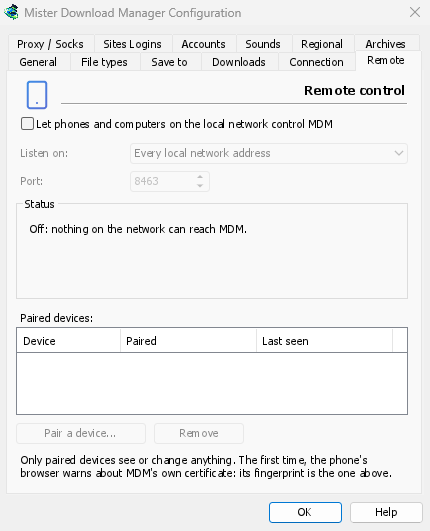
オンにする
- オプション → リモート。
- Tick Let phones and computers on the local network control GDM.
- OKをクリックします。
ページにはオンと表示され、https://192.168.1.20:8463/のような開くアドレスが表示されます。
The first time, Windows may ask whether to let GDM communicate on networks: allow it on private networks, or the phone can't reach GDM.
スマートフォンをペアリングする
- コンピューターで:オプション → リモート → デバイスのペアリング...。QRコード、アドレス、8桁のコードが表示されます。
- スマートフォンで、同じWi-Fiに接続し、カメラでQRコードをスキャンします(またはアドレスを入力します)。
- The browser warns that the connection's certificate isn't trusted. That is expected: GDM made its own certificate, on your computer, and no public authority knows it. To be sure the page is your GDM's, open the warning's details: the certificate's SHA-256 fingerprint is the one Options → Remote shows. Then continue to the page (Advanced → Proceed in Chrome, Show details → visit this website in Safari).
- QRコードをスキャンするとコードが入力されます。そうでない場合は入力してください。スマートフォンに名前を付け、ペアリングをタップします。コンピューターのウィンドウにその旨が表示され、完了で閉じます。
コードは1回限り、10分間有効で、5回間違えると無効になります。新しいコードをクリックして別のコードを取得してください。ページをワンタップで開けるようにするには、スマートフォンのホーム画面に追加します(ブラウザのメニュー:ホーム画面に追加)。
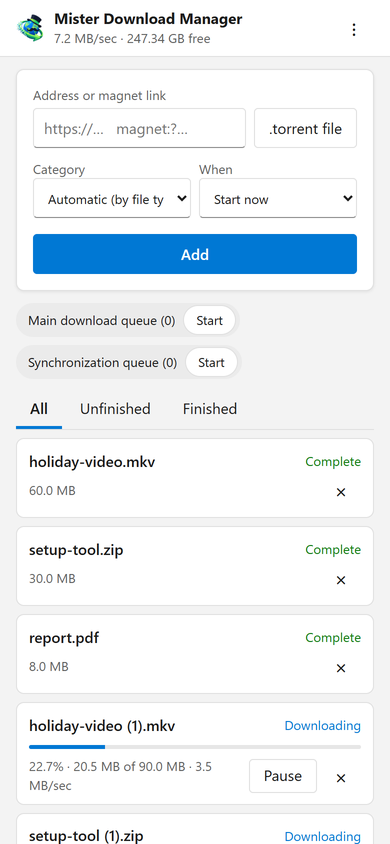
ページでできること
- Add: a download's address or a magnet link, or a
.torrentfile from the phone. Pick a Category (or let the file's type pick it), and When: Start now, or wait in a queue. A torrent is added with all its files, once GDM has read them (a magnet link can take a moment). - リスト:すべてのダウンロードの進行状況、速度、サイズが、すべて、未完了、完了で表示されます。一時停止と開始でそれぞれを操作し、×でリストから削除し、ファイルも削除でコンピューターからファイルも削除します。
- キュー:それぞれを開始および停止します。
- 上部のバーには、合計速度とダウンロード先の空き容量が表示されます。
Downloads added from the phone are like the ones you add on the computer: they go into the category's folder, follow the queues, the Scheduler and the speed limits, and go through the network adapter you chose in Options → Proxy / Socks (and stop when it disconnects). The page shows the language your phone uses when GDM has it, and follows its light or dark mode.
ペアリング済みデバイス
オプション → リモートには、ペアリングされたデバイス、ペアリングされた日時、最後に確認された日時が一覧表示されます。1つ選択して削除をクリックすると、次のリクエストからすぐに拒否されます(OKは不要です)。スマートフォンのページにある⋮ → このデバイスを登録解除でも、同じことが行われます。
スマートフォンを紛失しましたか?オプションで削除してください。全員を一度に停止するには、チェックボックスをオフにしてください。何もリッスンしなくなります。
リッスンする場所
- リッスンする場所:すべてのローカル ネットワーク アドレス(デフォルト)は、コンピューターの各プライベートアドレス(
192.168.x.x、10.x.x.x、172.16–31.x.x、およびIPv6のfd…)を1つずつリッスンし、別のネットワークに参加するとそれらに従います。このコンピューターのみは127.0.0.1をリッスンします。または、1つのアダプターの1つのアドレスを選択します。 - ポート:別のプログラムが使用していない限り
8463。その場合は別のポートを選択します(1024から65535)。
Don't make GDM reachable from the internet (a router's port forwarding): the remote control is made for your home network. To reach it while away, use a VPN to your home network instead (WireGuard, Tailscale): with Tailscale, choose its address in Listen on.
セキュリティ
リモートコントロールを安全に保つための要点:
- デフォルトでオフであり、オフの間は何もリッスンしません。
- ペアリング済みデバイスのみ:ペアリング以外のすべてのリクエストには、デバイスがペアリング時に取得したトークンが必要です。ペアリングコードは1回限り、10分間有効で、5回試行できます。試行は遅延されます。設定には、トークンではなく、各トークンのフィンガープリントが保持されます。
- Your local network only: GDM listens on the computer's private addresses, one by one, never on every address at once.
- 暗号化済み: HTTPSを使用し、コンピューターで作成および保持された証明書を使用します。そのフィンガープリントはオプションにあり、スマートフォンのブラウザに表示されるものと比較できます。
- Web pages can't use it: requests must name GDM's own address, come from its own page, and carry the token; GDM's page can't be shown inside another site.
- ダウンロードのみ: ペアリングされたデバイスは、ダウンロードのリスト表示、追加、一時停止、開始、削除、およびキューの開始と停止を行います。設定の変更、コンピューター上のウィンドウの開閉、フォルダーの表示はできません(取得するリストにはパスがありません)。
問題を見つけましたか?SECURITY.mdに記載されているように、非公開で報告してください。
無料、オープンソース、広告なし、試用期間なし。
Download GolinksPRO Download Manager