

Add a download from your phone, or from another computer at home, and watch it run on the
computer where GDM is: paste a link or a magnet link, send a .torrent file, see the list with
its progress, and pause, start or remove downloads. Your phone opens a small page that GDM
itself serves; nothing is installed on the phone, and no outside service is involved.
The remote control is off until you turn it on, it answers only phones and computers you paired with a code GDM shows, and it listens only on your local network (your Wi-Fi or your cable), never on an address the internet can reach.
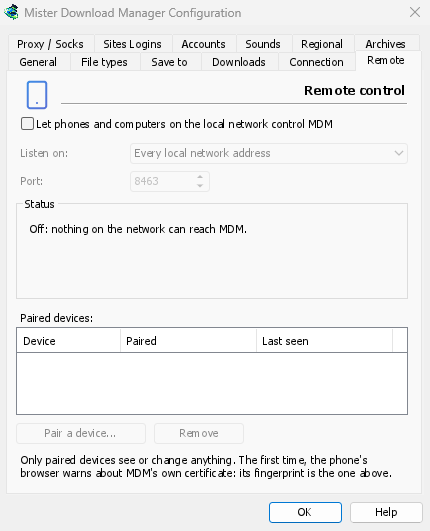
켜기
- 옵션 → 원격.
- Tick Let phones and computers on the local network control GDM.
- 확인을 클릭하세요.
그러면 페이지에 켜짐이라고 표시되고 https://192.168.1.20:8463/와 같이 열 주소가 표시됩니다.
The first time, Windows may ask whether to let GDM communicate on networks: allow it on private networks, or the phone can't reach GDM.
휴대폰 페어링
- 컴퓨터에서: 옵션 → 원격 → 장치 페어링... QR 코드, 주소 및 8자리 코드가 표시됩니다.
- 휴대폰에서 동일한 Wi-Fi에 연결된 상태에서: 카메라로 QR 코드를 스캔합니다(또는 주소를 입력합니다).
- The browser warns that the connection's certificate isn't trusted. That is expected: GDM made its own certificate, on your computer, and no public authority knows it. To be sure the page is your GDM's, open the warning's details: the certificate's SHA-256 fingerprint is the one Options → Remote shows. Then continue to the page (Advanced → Proceed in Chrome, Show details → visit this website in Safari).
- QR 코드를 스캔하면 코드가 채워집니다. 그렇지 않으면 코드를 입력합니다. 휴대폰 이름을 지정하고 페어링을 탭합니다. 컴퓨터의 창에 그렇게 표시되고 완료와 함께 닫힙니다.
코드는 10분 동안 한 번만 작동하며, 5번 잘못 시도하면 작동하지 않습니다. 다른 코드를 받으려면 새 코드를 클릭합니다. 페이지를 한 번의 탭으로 유지하려면 휴대폰의 홈 화면에 추가합니다(브라우저 메뉴: 홈 화면에 추가).
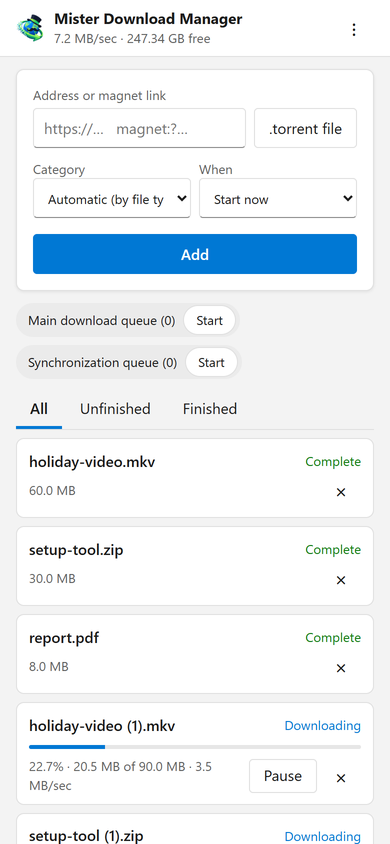
페이지 기능
- Add: a download's address or a magnet link, or a
.torrentfile from the phone. Pick a Category (or let the file's type pick it), and When: Start now, or wait in a queue. A torrent is added with all its files, once GDM has read them (a magnet link can take a moment). - 목록: 모든 다운로드의 진행 상황, 속도 및 크기가 모두, 미완료 및 완료됨과 함께 표시됩니다. 각 다운로드를 일시 중지하고 시작합니다. ×는 목록에서 제거하고, 파일도 삭제를 사용하면 컴퓨터에서 해당 파일도 삭제합니다.
- 대기열: 각 대기열을 시작하고 중지합니다.
- 상단의 막대에는 총 속도와 다운로드가 저장되는 여유 공간이 표시됩니다.
Downloads added from the phone are like the ones you add on the computer: they go into the category's folder, follow the queues, the Scheduler and the speed limits, and go through the network adapter you chose in Options → Proxy / Socks (and stop when it disconnects). The page shows the language your phone uses when GDM has it, and follows its light or dark mode.
페어링된 장치
옵션 → 원격에는 페어링된 장치, 각 장치가 페어링된 시기 및 마지막으로 본 시기가 나열됩니다. 하나를 선택하고 제거를 클릭합니다. 다음 요청부터 즉시 거부됩니다(확인할 필요 없음). 휴대폰에서는 페이지의 ⋮ → 이 장치 지우기가 같은 작업을 수행합니다.
휴대폰을 잃어버렸나요? 옵션에서 제거하세요. 모든 사람을 한 번에 중지하려면 확인란을 선택 취소하세요. 더 이상 아무것도 수신하지 않습니다.
수신 위치
- 수신 위치: 모든 로컬 네트워크 주소(기본값)는 컴퓨터의 각 개인 주소(
192.168.x.x,10.x.x.x,172.16–31.x.x및 IPv6의fd…)에서 하나씩 수신하며, 다른 네트워크에 연결할 때 이를 따릅니다. 이 컴퓨터만은127.0.0.1에서 수신합니다. 또는 하나의 어댑터의 한 주소를 선택합니다. - 포트: 다른 프로그램이 사용하지 않는 한
8463입니다. 그렇지 않으면 다른 포트(1024~65535)를 선택합니다.
Don't make GDM reachable from the internet (a router's port forwarding): the remote control is made for your home network. To reach it while away, use a VPN to your home network instead (WireGuard, Tailscale): with Tailscale, choose its address in Listen on.
보안
원격 제어를 안전하게 유지하는 방법 요약:
- 기본적으로 꺼져 있으며, 꺼져 있는 동안에는 아무것도 수신하지 않습니다.
- 페어링된 장치만: 페어링을 제외한 모든 요청에는 장치가 페어링될 때 받은 토큰이 필요합니다. 페어링 코드는 10분 동안 한 번만 작동하며, 5번의 시도 기회가 있고, 시도 속도가 느려집니다. 설정은 토큰 자체가 아닌 각 토큰의 지문을 보관합니다.
- Your local network only: GDM listens on the computer's private addresses, one by one, never on every address at once.
- 암호화됨: 컴퓨터에서 생성되어 보관된 인증서로 HTTPS를 사용합니다. 인증서 지문은 옵션에 있으며, 휴대폰 브라우저에 표시되는 지문과 비교할 수 있습니다.
- Web pages can't use it: requests must name GDM's own address, come from its own page, and carry the token; GDM's page can't be shown inside another site.
- 다운로드만 가능: 페어링된 장치는 다운로드를 나열, 추가, 일시 중지, 시작 및 제거하고, 대기열을 시작 및 중지할 수 있습니다. 설정을 변경하거나, 컴퓨터에서 창을 열거나, 폴더를 볼 수 없습니다 (받는 목록에는 경로가 없습니다).
문제를 발견하셨습니까? SECURITY.md에 따라 비공개로 보고해 주십시오.
무료, 오픈 소스, 광고 없음, 평가판 없음.
Download GolinksPRO Download Manager