

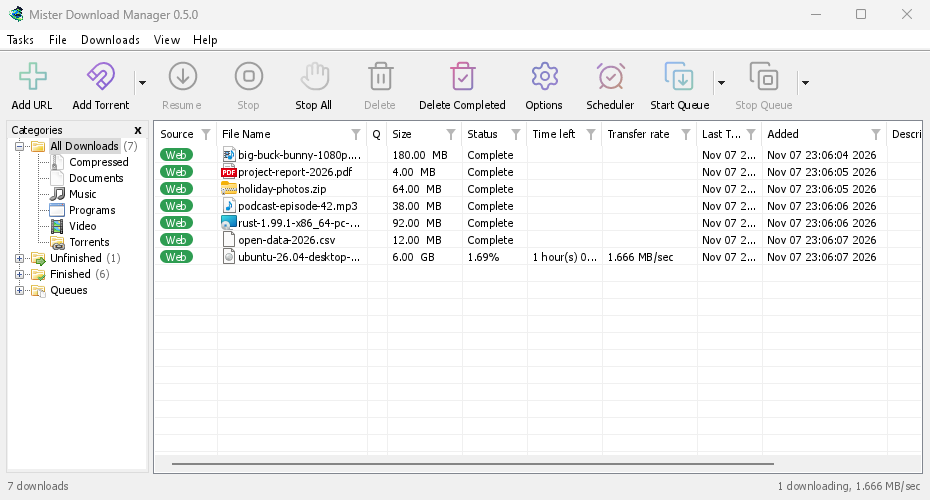
GolinksPRO Download Manager (GDM) is a free download manager for Windows and Linux (and, still experimental, macOS). It is laid out the way Internet Download Manager users expect: a toolbar, categories on the left, one list of downloads and a browser extension that hands downloads to it.
หน้านี้จะอธิบายแต่ละส่วนของโปรแกรม คู่มือจะแนะนำสิ่งที่ผู้คนทำบ่อยที่สุด โดยแยกเป็นแต่ละงาน
เริ่มต้นที่นี่
- Getting started — install GDM (setup, portable or zip on Windows; the packages on Linux; the .dmg on a Mac), choose a language and find your way around the main window.
- การดาวน์โหลดครั้งแรกของคุณ — คำแนะนำสองนาทีตั้งแต่การคัดลอกลิงก์ไปจนถึงการเปิดไฟล์
การดาวน์โหลด
- การเพิ่มการดาวน์โหลด — เพิ่ม URL, คลิปบอร์ด, เป้าหมายการลากและวาง, การดาวน์โหลดเป็นชุดและรายการลิงก์, และ เริ่มการดาวน์โหลด เทียบกับ ดาวน์โหลดภายหลัง
- ตัวคว้าลิงก์และไฟล์เก็บถาวร — หลายลิงก์พร้อมกันในแพ็กเกจ; ไฟล์เก็บถาวร zip, 7z และ rar จะถูกแตกไฟล์เมื่อดาวน์โหลดเสร็จ
- Browser integration — the extension for Firefox (from addons.mozilla.org), Chrome, Edge, Brave, Opera and Vivaldi (from the Chrome Web Store), which downloads it takes, and what happens when GDM isn't running.
- Run GDM on a server — GDM without a window on a home server or NAS (Docker, Unraid), downloading into its folders; send it downloads from your phone or browser.
- Control GDM from your phone — add links, magnets and torrents from a phone or another computer at home, and watch and control the list.
การจัดระเบียบ
- รายการดาวน์โหลด — คอลัมน์, ตัวกรอง, โครงสร้างหมวดหมู่, การเลือกดาวน์โหลดหลายรายการ, การค้นหารายการเดียว, และการลบการดาวน์โหลดพร้อมหรือไม่พร้อมไฟล์
- คิวและตัวจัดกำหนดการ — เรียกใช้การดาวน์โหลดทีละไม่กี่รายการ, เริ่มและหยุดตามเวลาที่กำหนด, และปิดคอมพิวเตอร์เมื่อเสร็จสิ้น
ความเร็วและการเชื่อมต่อ
- Connections and speed — the progress window, how GDM splits a file over several connections, resuming, and the Speed Limiter.
วิดีโอและทอร์เรนต์
- ดาวน์โหลดวิดีโอ — ดาวน์โหลดวิดีโอจากหน้าเว็บ (YouTube, Vimeo และอื่นๆ อีกมากมาย) ด้วย yt-dlp
- แกลเลอรีรูปภาพ — ดาวน์โหลดรูปภาพจากแกลเลอรี (Wikimedia Commons, Flickr, DeviantArt และอื่น ๆ อีกมากมาย) ด้วย gallery-dl
- ทอร์เรนต์ — ลิงก์แม่เหล็กและไฟล์ .torrent, การเลือกไฟล์, และการแชร์
- ทอร์เรนต์และความปลอดภัยของคุณ — สิ่งที่คนอื่นเห็น, สวิตช์เครือข่าย, บัญชีดำ, พร็อกซี
- บัญชีบริการ Debrid — Real-Debrid, AllDebrid และ Premiumize: ลิงก์จากโฮสต์ไฟล์ผ่านบัญชีของคุณ
การตั้งค่า
- ตัวเลือก — ทุกหน้าของหน้าต่าง ตัวเลือก
- ธีม — รูปแบบในตัว (คลาสสิก, ตามระบบ, ความคมชัดสูง, เมโทร, Adwaita, Breeze, Luna, Aero, Aqua) และวิธีสร้างธีมของคุณเองในไฟล์ข้อความ
- ภาษา — 86 ภาษาสำหรับส่วนติดต่อผู้ใช้, รูปแบบตัวเลขและวันที่, การจัดวางจากขวาไปซ้าย และวิธีช่วยแปล
- Portable mode — run GDM from a folder or a USB stick without installing it.
- แป้นพิมพ์ลัด — ทุกปุ่มที่หน้าต่างหลักตอบสนอง และโปรแกรมอ่านหน้าจอ
- บรรทัดคำสั่งและการทำงานอัตโนมัติ — สวิตช์บรรทัดคำสั่งของ IDM, เครื่องมือ
misterdownloadmanager-cli, และ API การทำงานอัตโนมัติที่โปรแกรมอื่นสามารถใช้ได้ - ผู้ช่วย AI (MCP) — ให้ Claude, Cursor, VS Code หรือผู้ช่วย MCP อื่นๆ แสดงรายการ, เพิ่ม, หยุดชั่วคราว และลบการดาวน์โหลดของคุณ
บทช่วยสอน
- ดาวน์โหลดไฟล์ — คัดลอกลิงก์, เพิ่ม, เปิดไฟล์
- Catch downloads from your browser — set up the extension so clicked downloads go to GDM.
- ดาวน์โหลดข้ามคืน — จัดคิวไฟล์และให้ ตัวจัดกำหนดการ เริ่มต้นในเวลากลางคืน
- ดำเนินการต่อการดาวน์โหลดที่เสียหาย — ดำเนินการต่อหลังจากตัดการเชื่อมต่อ, โปรแกรมขัดข้อง หรือลิงก์หมดอายุ
- Keep some speed for everything else — cap GDM so browsing and calls stay smooth.
- ดาวน์โหลดวิดีโอจากหน้าเว็บ — เลือกคุณภาพและบันทึกวิดีโอ
- Carry GDM on a USB stick — the portable copy, with downloads saved to the stick.
- ค้นหาการดาวน์โหลดในรายการยาว — ค้นหา, ค้นหาถัดไป และตัวกรองคอลัมน์
วิธีใช้
- Crash reports — what the crash report window shows when GDM closes unexpectedly or stops responding, what a report contains, and how to send it.
- การแก้ไขปัญหา — สิ่งที่ต้องตรวจสอบเมื่อดาวน์โหลดไม่สำเร็จ เบราว์เซอร์ไม่ส่งลิงก์ดาวน์โหลดให้ GDM หรือกำหนดการไม่เริ่มทำงาน
- The browser and GDM aren't connected — what the extension's red ! means, reason by reason, and how to fix each.
- รุ่น — ดาวน์โหลดเวอร์ชันล่าสุด
- Report a problem — or use Help → Report a problem in GDM, which fills in your version, system and how GDM was installed for you.
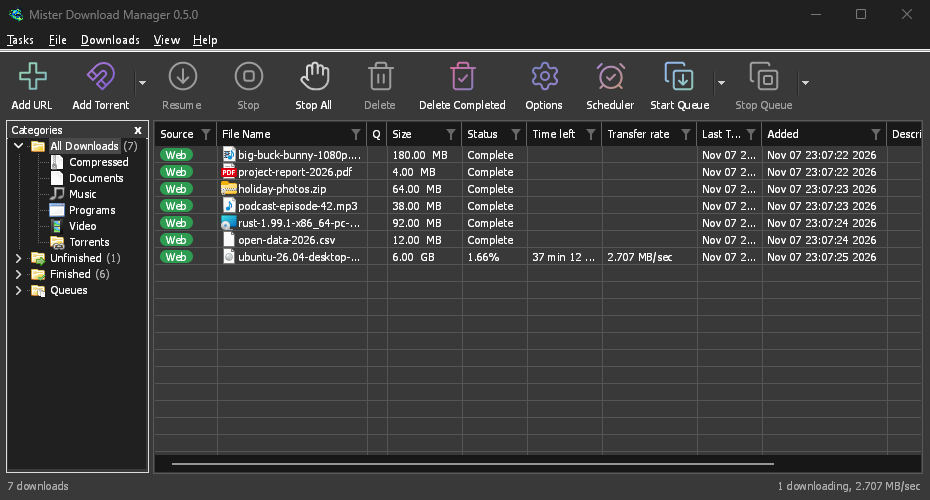
Screenshots in these docs show Windows and the light theme unless noted; on the website each has its dark version beside it. GDM follows the system's dark mode: when Windows (or your desktop) is set to dark, GDM is dark too.
ฟรี, โอเพนซอร์ส, ไม่มีโฆษณา, ไม่มีช่วงทดลองใช้
Download GolinksPRO Download Manager