

ポケットの中のダウンロード
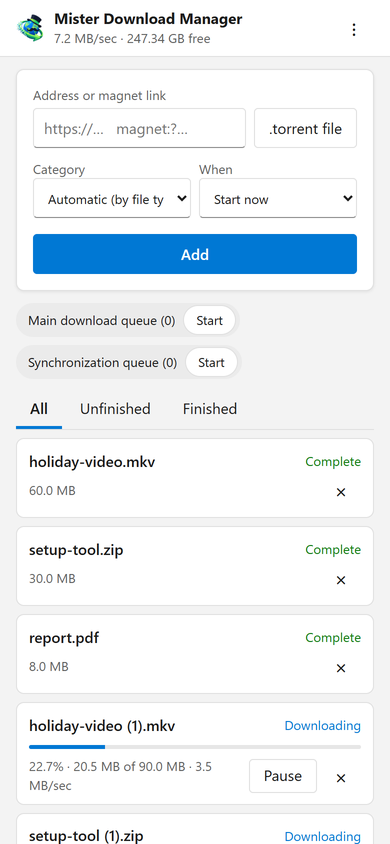
このページでは、スマートフォンのアドレス、マグネット リンク、または .torrent ファイルを、カテゴリと時期 (今すぐ開始するか、キューで待機するか) とともにダウンロードに追加します。すべてのダウンロードを進行状況、速度、サイズとともに一覧表示し、それぞれを一時停止、開始、および要求に応じてファイルとともに削除します。キューの開始と停止も行います。上部のバーには、合計速度とダウンロード先の空き容量が表示されます。
Downloads added from the phone behave like any other: they go to the category's folder and follow the queues, the Scheduler and the speed limits. The page speaks your phone's language when GDM has it, and follows its light or dark mode.
コードで一度だけペアリング
オプション → リモートでオンにしてから、デバイスのペアリング...をクリックします。スマートフォンのカメラで QR コードをスキャンするか、アドレスと 8 桁のコードを入力します。コードは 10 分間、一度だけ有効です。
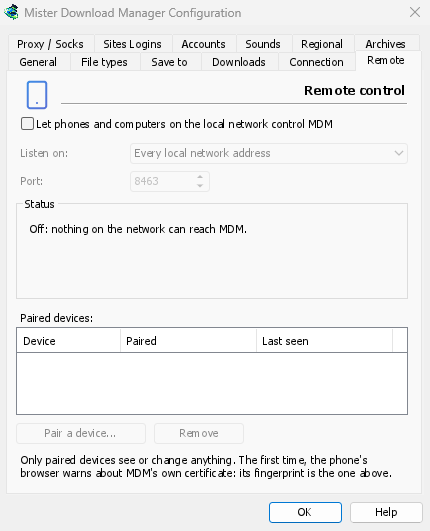
The first time, the phone's browser warns about the certificate. That is expected: GDM made it on your computer, and no public authority knows it. Options → Remote shows its fingerprint to compare. Add the page to the phone's home screen to keep it one tap away.
自分のデバイスのみ、自宅のみ
リモート コントロールは、オンにするまでオフになっています。ペアリングしたデバイスのみに応答し、各デバイスはオプションですぐに削除できます。また、コンピューターのプライベート ネットワーク アドレスのみをリッスンし、インターネットからアクセスできるアドレスでは決してリッスンしません。すべて HTTPS 経由で行われ、Web ページはそれを使用できません。
ペアリングされたスマートフォンは、ダウンロードとキューを処理するだけで、それ以上はできません。設定を変更したり、コンピューターでウィンドウを開いたり、フォルダーを表示したりすることはできません。
外出先から
Don't open it to the internet through your router. To reach it while you're away, use a VPN to your home network, such as WireGuard or Tailscale; with Tailscale, choose its address under Listen on. The first time, Windows may ask whether GDM may use the network: allow it on private networks, or the phone can't reach GDM.
To run GDM on a home server instead, see Server mode.
無料、オープンソース、広告なし、試用期間なし。
Download GolinksPRO Download Manager