

- Strona główna
- Funkcje
- Zdalne sterowanie
Dodaj pobieranie z kanapy
Your phone opens a small page that GDM itself serves on your home network. Paste a link, a magnet link or a torrent file, and watch it download on the computer. Nothing to install on the phone, and no outside service.
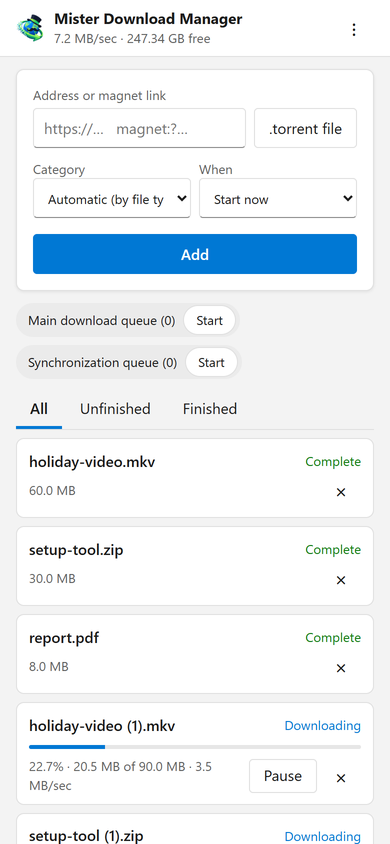
Twoje pobrane pliki w kieszeni
Strona dodaje adres pobierania, link magnetyczny lub plik .torrent z telefonu, z Kategorią i Kiedy: rozpocznij teraz lub poczekaj w kolejce. Wyświetla każde pobieranie z jego postępem, prędkością i rozmiarem, wstrzymuje i uruchamia każde z nich oraz usuwa je wraz z plikiem, jeśli sobie tego życzysz. Uruchamia i zatrzymuje również kolejki. Pasek u góry pokazuje całkowitą prędkość i wolne miejsce, gdzie trafiają Twoje pobrane pliki.
Downloads added from the phone behave like any other: they go to the category's folder and follow the queues, the Scheduler and the speed limits. The page speaks your phone's language when GDM has it, and follows its light or dark mode.
Sparowane raz, za pomocą kodu
Włącz tę funkcję w Opcje → Zdalne, a następnie kliknij Sparuj urządzenie.... Zeskanuj kod QR aparatem telefonu lub wpisz adres i 8-cyfrowy kod. Kod działa raz, przez dziesięć minut.
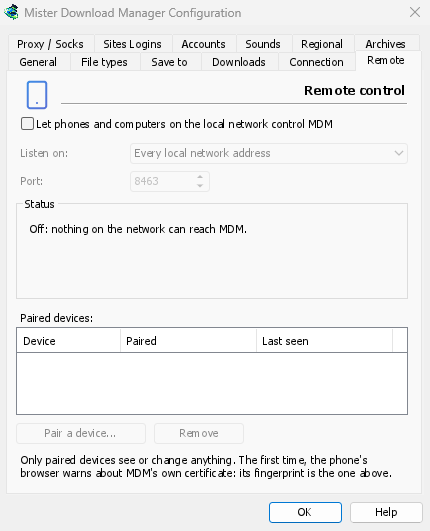
The first time, the phone's browser warns about the certificate. That is expected: GDM made it on your computer, and no public authority knows it. Options → Remote shows its fingerprint to compare. Add the page to the phone's home screen to keep it one tap away.
Tylko Twoje urządzenia, tylko w domu
Zdalne sterowanie jest wyłączone, dopóki go nie włączysz. Odpowiada tylko sparowanym urządzeniom, każde można natychmiast usunąć w Opcjach, i nasłuchuje tylko na prywatnych adresach sieciowych komputera, nigdy na tych dostępnych z internetu. Wszystko odbywa się przez HTTPS, a strony internetowe nie mogą z tego korzystać.
Sparowany telefon obsługuje pobieranie i kolejki, nic więcej: nie może zmieniać ustawień, otwierać okien na komputerze ani przeglądać Twoich folderów.
Poza domem
Don't open it to the internet through your router. To reach it while you're away, use a VPN to your home network, such as WireGuard or Tailscale; with Tailscale, choose its address under Listen on. The first time, Windows may ask whether GDM may use the network: allow it on private networks, or the phone can't reach GDM.
To run GDM on a home server instead, see Server mode.
Darmowy, open source, bez reklam, bez wersji próbnej.
Download GolinksPRO Download Manager