

您的下载,尽在掌握
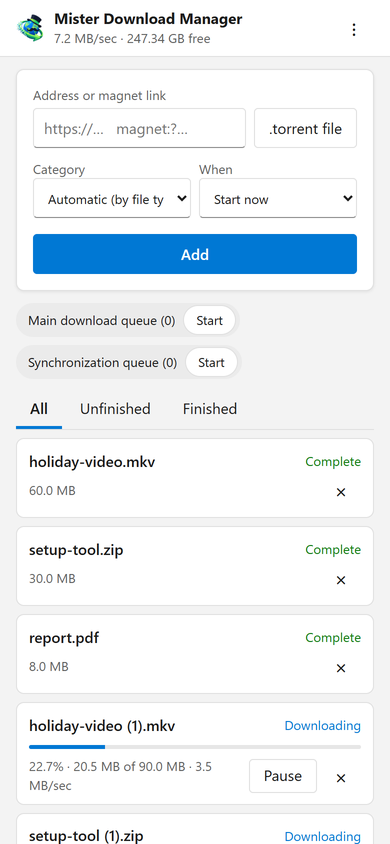
该页面可从手机添加下载地址、磁力链接或 .torrent 文件,并带有类别和何时:立即开始,或在队列中等待。它列出每个下载的进度、速度和大小,可以暂停、开始和删除每个下载(如果需要,包括文件)。它还可以启动和停止队列。顶部的栏显示总速度和下载文件的可用空间。
Downloads added from the phone behave like any other: they go to the category's folder and follow the queues, the Scheduler and the speed limits. The page speaks your phone's language when GDM has it, and follows its light or dark mode.
一次配对,使用代码
在选项 → 远程中打开它,然后点击配对设备...。用手机摄像头扫描二维码,或输入地址和 8 位代码。一个代码只能使用一次,有效期为十分钟。
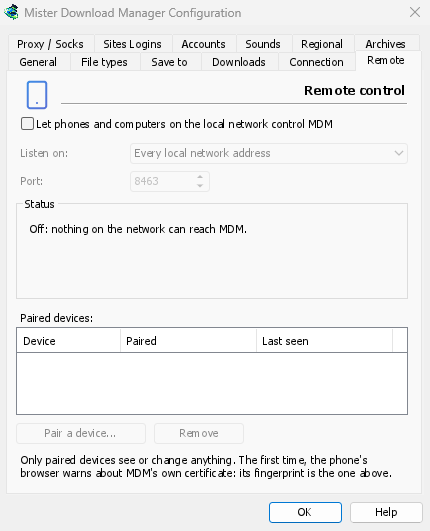
The first time, the phone's browser warns about the certificate. That is expected: GDM made it on your computer, and no public authority knows it. Options → Remote shows its fingerprint to compare. Add the page to the phone's home screen to keep it one tap away.
仅限您的设备,仅限家中
远程控制在您打开之前是关闭的。它只响应您已配对的设备,每个设备都可以在“选项”中立即移除,并且只监听电脑的私有网络地址,绝不监听互联网可访问的地址。所有通信都通过 HTTPS 进行,网页无法使用它。
已配对的手机只能处理下载和队列,仅此而已:它无法更改设置、在电脑上打开窗口或查看您的文件夹。
外出时
Don't open it to the internet through your router. To reach it while you're away, use a VPN to your home network, such as WireGuard or Tailscale; with Tailscale, choose its address under Listen on. The first time, Windows may ask whether GDM may use the network: allow it on private networks, or the phone can't reach GDM.
To run GDM on a home server instead, see Server mode.
免费、开源、无广告、无试用版。
Download GolinksPRO Download Manager