

आपकी सूची एक फ़ाइल में आती है
In IDM, choose Tasks → Export → To IDM export file. In GDM, choose Tasks → Import → From
IDM export file and pick that .ef2 file. Each download comes over with its address, the page
it came from (its referrer) and its cookies. The downloads join the Main download queue,
ready to start.
लिंक की एक साधारण सूची भी काम करती है
कार्य → आयात करें → टेक्स्ट फ़ाइल से एक टेक्स्ट फ़ाइल पढ़ता है और उसमें हर वेब पते को चुनता है। आप सीधे डाउनलोड सूची पर एक .txt या .ef2 सूची भी छोड़ सकते हैं। जो आप नहीं चाहते उसे अनटिक करें, और बाकी को कतार में जोड़ें।
दूसरी तरह से जाना भी उतना ही आसान है: कार्य → निर्यात करें → पाठ फ़ाइल में प्रति पंक्ति एक पता सहेजता है, और IDM निर्यात फ़ाइल में एक .ef2 फ़ाइल लिखता है।
कुछ भी नया सीखने की ज़रूरत नहीं
GDM is a separate program, written from scratch, but its windows are laid out the way IDM users expect: the toolbar, the categories, the download list, the progress window with every connection, queues and the Scheduler. It is free, with no trial and no sign-up.
IDM is the more mature product, refined over many years. GDM finished faster in our benchmark: a 1 GiB file in 1.0 s against IDM 6.42's 5.5 s, on the same PC and the same test server. The FAQ sums up the other differences.
जोड़ने से पहले चुनें
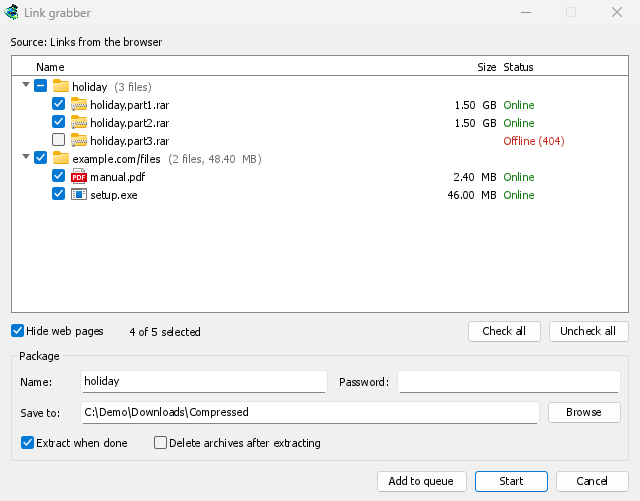
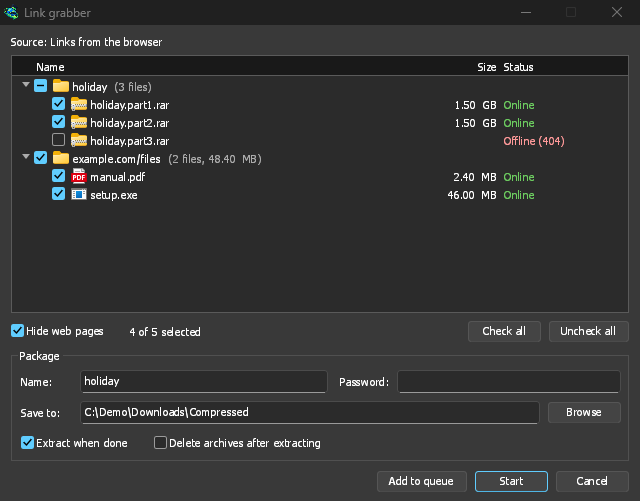
एक आयात लिंक ग्रैबर खोलता है, जो लिंक को पैकेजों में छाँटता है: एक संग्रह के वॉल्यूम एक साथ, एक पृष्ठ के लिंक एक साथ, बाकी विभिन्न फ़ाइलें में। प्रत्येक लिंक को उसके वास्तविक नाम, उसके आकार और सर्वर पर अभी भी है या नहीं, के लिए देखा जाता है, और जो चले गए हैं वे अनटिक हो जाते हैं। आपकी सूची में पहले से मौजूद एक लिंक पहले से सूची में है के तहत आता है, अनटिक किया हुआ।
कतार में जोड़ें टिक किए गए लिंक को मुख्य डाउनलोड कतार में जोड़ता है, जैसा कि आयात हमेशा करता था, और शुरू करें कतार को भी शुरू करता है। एक .ef2 फ़ाइल अभी भी प्रत्येक डाउनलोड का रेफ़रर और कुकीज़ लाती है। लिंक ग्रैबर और संग्रह देखें।
मुफ़्त, ओपन सोर्स, कोई विज्ञापन नहीं, कोई ट्रायल नहीं।
Download GolinksPRO Download Manager