

어디서든 링크
Right-click a page in the browser for Download all links with GolinksPRO Download Manager, or
select part of it for Download selected links with GolinksPRO Download Manager. The page's referrer and cookies go with each
link. You can also import a text file or an .ef2 export with Tasks → Import, drop a list on
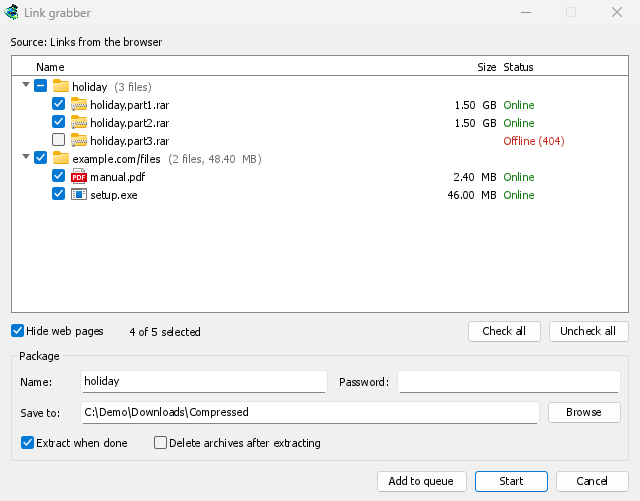
the download list, or open Tasks → Link grabber... and paste any text with Ctrl+V: every
web address in it is added.
다운로드 목록에 이미 있는 링크는 이미 목록에 있습니다 아래에 선택 해제된 상태로 표시됩니다.
패키지로 분류
분할 압축 파일(movie.part1.rar, movie.part2.rar 등)의 볼륨은 하나의 패키지를 형성하고, 페이지의 다른 링크는 또 다른 패키지를 형성하며, 나머지는 기타 파일로 이동합니다. 패키지를 선택하면 모든 링크가 선택됩니다. 각 패키지에는 고유한 폴더, 압축 파일 암호 및 완료 시 추출 옵션이 있습니다.
시작은 선택된 링크를 기본 다운로드 대기열에 추가하고 시작합니다. 대기열에 추가는 시작하지 않고 추가합니다.
다운로드 전 확인
As links arrive, GDM asks each server about its file, a few at a time. Each link then shows its real name and size, and whether it is Online, Offline (404), Needs a login or Busy, try later. Offline links come unticked, so you don't queue what isn't there. Links to web pages are hidden by default.
일부 파일 호스트는 조회수를 다운로드로 계산합니다. 옵션 → 압축 파일에서 조회 기능을 끄세요.
도착 시 압축 파일 압축 해제
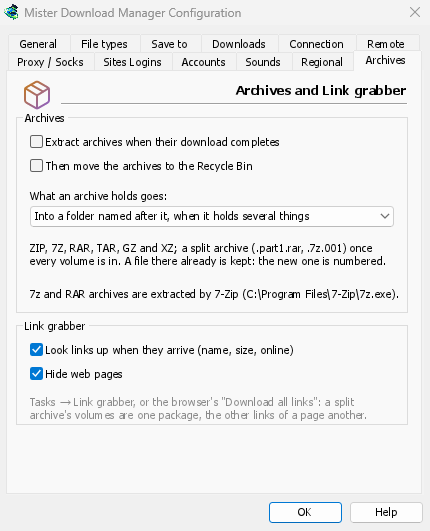
GDM extracts ZIP (encrypted ones too), TAR, TAR.GZ, TAR.XZ, GZ and XZ itself. 7z and RAR need 7-Zip, a free program: RAR's own extraction code can't be part of a free program like GDM. When 7-Zip isn't installed, a window says so, with a button to get it.
분할 압축 파일은 마지막 볼륨이 들어오면 추출됩니다. 추출은 신중하게 이루어집니다. 폴더 밖으로 나갈 수 있는 이름은 제외되고, 디스크를 가득 채울 수 있는 압축 파일은 먼저 중지되며, 기존 파일은 절대 덮어쓰지 않습니다. 압축 파일 자체는 요청 시에만 휴지통으로 이동됩니다.
무료, 오픈 소스, 광고 없음, 평가판 없음.
Download GolinksPRO Download Manager